Category: Uncategorized

  • How to Monitor and Troubleshoot SAP CPI Integration Flows

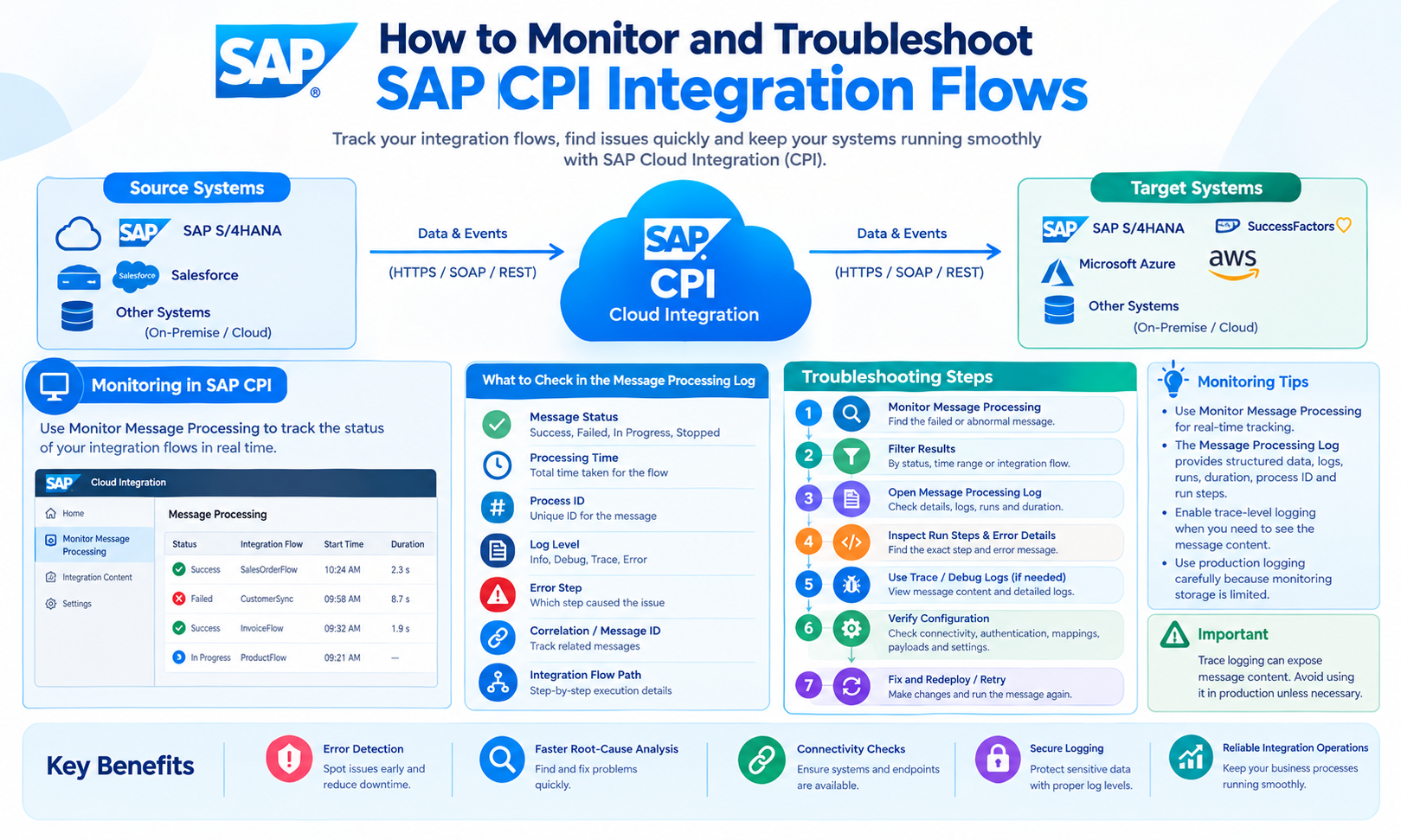
    How to Monitor and Troubleshoot SAP CPI Integration Flows

    SAP CPI Integration is used to connect SAP and non-SAP applications, exchange business data, and automate integration processes. As the number of connected systems increases, monitoring becomes an important part of managing integration flows. SAP Cloud Integration provides monitoring capabilities that allow integration teams to review message processing, identify failed messages, inspect processing steps, and analyze errors.

    SAP CPI is commonly used as a name for SAP Cloud Integration. In current SAP terminology, Cloud Integration is a capability of SAP Integration Suite on SAP Business Technology Platform (SAP BTP). Integration flows define the senders, receivers, adapters, and processing steps used to move and transform messages between systems.

    A proper monitoring and troubleshooting process helps identify where a message failed, what caused the failure, and which configuration or system needs attention. This guide explains how to monitor SAP CPI Integration flows, understand message processing logs, troubleshoot common errors, use trace information, and improve operational visibility.

    What Is SAP CPI Integration Monitoring?

    SAP CPI Integration monitoring is the process of checking integration flows and their message-processing results in SAP Cloud Integration. The monitoring application provides information about messages processed at runtime and allows users to inspect individual message-processing records.

    The Monitor Message Processing area shows processed messages, their integration flow, status, properties, logs, and artifact details. The available information depends on the configured log level and the processing result.

    Monitoring can help answer important operational questions:

    Was the integration flow executed?

    Was the message processed successfully?

    Where did the message fail?

    Which integration flow processed the message?

    What error occurred?

    How long did processing take?

    Was the message retried?

    Which processing step generated the error?

    These details provide the starting point for troubleshooting.

    Why Monitor SAP CPI Integration Flows?

    An integration flow can involve several systems and processing steps. A single business transaction may pass through an API endpoint, transformation, router, script, receiver adapter, and target application.

    If one component fails, the complete transaction can be affected.

    SAP Cloud Integration provides message processing logs that contain information about processing steps. When an integration flow fails, the monitoring interface can show retry runs and detailed information about individual processing steps.

    Regular monitoring can help identify recurring failures, connectivity problems, incorrect data, authentication issues, and configuration errors.

    It can also help identify integration flows that generate unusually large numbers of processing logs or consume significant monitoring storage.

    SAP CPI Integration Monitoring Dashboard

    The monitoring area acts as a central location for checking integration content and message processing. SAP documentation describes monitoring capabilities for processed messages, errors, integration artifacts, data stores, variables, message queues, and other runtime information.

    The Monitor Message Processing screen provides a list of processed messages. Selecting a message displays additional information about its processing.

    Important information can include:

    Status: Shows whether processing was successful or unsuccessful.

    Properties: Shows runtime properties that can also be used for searching and correlation.

    Logs: Provides processing information and, depending on the log level, more detailed execution information.

    Artifact Details: Provides information about the integration artifact that processed the message.

    This information can be used to move from a general failure notification to the specific processing step that caused the problem.

    How to Find a Failed Message

    The first troubleshooting step is usually to identify the failed message.

    Open the monitoring area of the SAP Cloud Integration tenant and use Monitor Message Processing. Messages can be filtered using information such as status, time period, integration flow, and identifiers.

    After locating the failed message, open its message processing log.

    SAP documentation shows that the message processing log contains information about the integration flow, processing date and time, status, properties, logs, and individual run steps.

    The error can then be examined at the processing-step level.

    This approach is more precise than checking the complete integration flow without knowing which message failed.

    Understanding the Message Processing Log

    The Message Processing Log, or MPL, stores information about messages processed by Cloud Integration.

    It can contain information about individual processing steps. When a message fails, the detailed view can show the sequence of steps and identify the step associated with the error.

    For example, an integration flow may contain these steps:

    HTTPS Sender

         ↓

    Content Modifier

         ↓

    Message Mapping

         ↓

    Router

         ↓

    SOAP Receiver

    If the SOAP receiver fails, the message processing log can help identify the receiver step as the point where the failure occurred.

    The detailed log can then be used to investigate the error message, runtime properties, and processing information.

    How to Use Trace for Troubleshooting

    Trace information can provide additional details during troubleshooting.

    SAP documentation states that the message content section can be reviewed when the log level is set to Trace. Trace data can also help display the path taken by a message through the integration flow.

    Trace should be used carefully in productive environments because message payload and detailed runtime information can increase monitoring data and resource usage.

    SAP guidance also states that storing message payloads in processing logs for productive scenarios can cause significant memory consumption.

    For troubleshooting, a controlled trace session can help determine whether the message was transformed correctly, whether a router selected the expected branch, or whether a specific processing step changed the message unexpectedly.

    Log Levels in SAP CPI Integration

    Log levels determine how much information is available in message monitoring.

    A higher level of logging can provide more troubleshooting information, but it can also increase monitoring data.

    SAP documentation describes different log levels and explains that detailed message content is available when trace logging is enabled. SAP guidance for productive environments recommends appropriate logging settings to support performance and operational requirements.

    For production systems, logging should be configured according to the monitoring requirements and the sensitivity of the data being processed.

    Payloads may contain customer information, financial information, employee data, credentials, or other business-sensitive information. Such information should not be unnecessarily stored in monitoring logs.

    Troubleshooting Connectivity Errors

    Connectivity problems are common causes of integration failures.

    A receiver system may be unavailable, a network connection may fail, or the configured endpoint may be incorrect.

    For example:

    SAP CPI Integration

            ↓

    Receiver Adapter

            ↓

    External System

            X

       Connection Failed

    The message processing log should be checked first. The error information can indicate whether the problem is related to the endpoint, authentication, connection, timeout, or receiver system.

    SAP Cloud Integration also provides connectivity test capabilities for supported outbound transport protocols. These tools can help determine whether the tenant can communicate with a receiver system.

    The troubleshooting process should separate integration-flow errors from external-system availability problems.

    Troubleshooting Authentication Errors

    Authentication errors occur when Cloud Integration cannot authenticate successfully with a sender or receiver.

    Typical causes include expired credentials, incorrect credentials, invalid certificates, missing authorization, or an incorrect authentication configuration.

    The message processing log can provide the first indication of an authentication failure.

    Security material should then be checked according to the integration scenario.

    The exact authentication method depends on the adapter and target system. REST APIs, SOAP services, SAP systems, and third-party applications can use different authentication mechanisms.

    Credentials should not be placed directly inside integration-flow scripts or message payloads.

    Troubleshooting HTTP Errors

    REST and HTTP-based integrations can return HTTP status codes that indicate the result of a request.

    For example, a request may fail because of an invalid resource, authentication problem, client-side error, or server-side error.

    When an HTTP-based integration fails, check the following information in the message processing log:

    The endpoint used by the flow.

    The HTTP method.

    The response status.

    The response message.

    The authentication configuration.

    The receiver system availability.

    The request and response structure.

    The exact interpretation of an HTTP error depends on the API implementation and the response returned by the receiving service.

    Troubleshooting SOAP Errors

    SOAP integrations can fail because of invalid XML, incorrect service configuration, authentication problems, schema mismatches, or SOAP faults.

    A SOAP fault can provide information about an application or service error.

    When troubleshooting a SOAP-based SAP CPI Integration flow, check the SOAP receiver configuration and the message processing log.

    The XML structure should match the service requirements. If the service is based on a WSDL, the request should conform to the interface defined by that service.

    An incorrect namespace, missing required element, invalid data type, or incorrect operation can cause a SOAP request to fail.

    Troubleshooting Message Mapping Errors

    Message mapping is frequently used to transform data between source and target structures.

    For example:

    Source System

         ↓

    JSON / XML

         ↓

    Message Mapping

         ↓

    Target Structure

    A mapping failure can occur when a required source field is missing, a data type is incorrect, or the target structure does not match the expected format.

    The message processing log can help identify the processing step where the mapping failed.

    The source payload, mapping definition, target schema, and runtime values should be reviewed together.

    This is important because a mapping may work with one message and fail with another if the incoming data is inconsistent.

    Troubleshooting Router and Conditional Logic

    Routers allow an integration flow to choose different processing paths based on conditions.

    For example:

    Incoming Message

           ↓

         Router

         /    \

       Path A  Path B

    A message may take the wrong path if a condition does not match the actual value in the message.

    When troubleshooting routing problems, inspect the values used by the router condition.

    Check whether the required property or header exists. Check the data type and exact value. Also check whether the condition is case-sensitive or dependent on a particular message structure.

    The processing log can help show the route taken by the message when sufficient trace information is available.

    Troubleshooting Script Errors

    Groovy and other scripting approaches can be used for specific processing requirements in Cloud Integration.

    Script errors can result from syntax problems, incorrect property names, unexpected null values, invalid data types, or assumptions about the message structure.

    When a script fails, identify the exact processing step in the message processing log.

    Then review the script and the input data available at that point.

    A script that expects a field such as customerId may fail if the source message does not contain that field.

    Testing with multiple valid and invalid payloads can help identify data-dependent script failures.

    Troubleshooting Timeout Errors

    A timeout occurs when a system does not respond within the expected period.

    Timeouts can occur because of slow receiver systems, network conditions, large messages, long-running backend operations, or configuration limits.

    The message processing log should be checked for duration and error information. SAP documentation provides processing-run information such as start time and duration in the message processing log.

    If timeouts occur repeatedly, the receiver system and network path should also be investigated.

    The integration design should avoid unnecessary processing steps and should use suitable communication patterns for long-running business processes.

    Understanding Retry Behavior

    Some integration scenarios require message retries when temporary failures occur.

    SAP Cloud Integration supports retry mechanisms through specific components and patterns. SAP documentation describes retry handling using components such as the JMS adapter with a JMS queue and the XI sender adapter.

    Retries should be distinguished from permanent failures.

    A temporary receiver outage may recover after a retry. An invalid customer ID or incorrect XML structure will generally require data or configuration correction rather than repeated processing.

    Retry behavior should therefore match the type of failure.

    Using Correlation IDs for Troubleshooting

    A business transaction can pass through multiple integration flows.

    A correlation ID can help connect related processing records.

    SAP Cloud Integration monitoring supports properties that can be used as filter criteria. SAP documentation specifically describes the use of correlation information to find related messages.

    For example:

    Order Request

         ↓

    Integration Flow A

         ↓

    Integration Flow B

         ↓

    Integration Flow C

    If all related messages use an appropriate correlation identifier, the integration team can trace the transaction across multiple flows.

    This is particularly useful in complex SAP CPI Integration landscapes.

    Using Custom Header Properties

    Custom header properties can provide additional search information for monitoring.

    SAP documentation states that custom header properties can be set in a Script step and displayed in the Monitor application. They can also be retrieved through the Message Processing Logs OData API.

    For example, a business identifier such as a purchase order number can be stored as a custom property.

    This can make troubleshooting easier because support teams can search for a business value instead of relying only on a technical message ID.

    Monitoring Integration Performance

    Monitoring should include more than failed messages.

    Processing duration, message volume, and monitoring storage usage can also provide useful operational information.

    SAP Cloud Integration provides monitoring information for integration-flow processing and message volumes. SAP documentation also provides tools for inspecting monitoring storage usage and identifying integration flows that generate large numbers of message processing logs.

    Monitoring storage is important because excessive logging can increase stored monitoring data.

    SAP documentation states that the default monitoring storage capacity is 35 GB for the documented Cloud Foundry environment and that monitoring data is automatically removed after the configured retention period, which is 30 days by default in the referenced documentation.

    These values can be subject to SAP environment and configuration details, so the tenant’s current settings should be checked.

    How to Troubleshoot SAP CPI Integration Step by Step

    A structured troubleshooting process starts with the failed message.

    First, identify the integration flow and processing time. Then open the Message Processing Log and review the message status.

    Next, identify the processing step where the error occurred. Review the error message, properties, logs, and available trace information.

    After identifying the technical cause, determine whether the problem is related to the source system, integration configuration, transformation, routing, authentication, network, receiver system, or business data.

    Correct the root cause and test the integration again.

    The final step is to confirm that the message processes successfully and that related downstream flows also complete correctly.

    Common SAP CPI Integration Problems

    Several categories of problems can appear during integration-flow execution.

    Connectivity: The receiver or sender cannot be reached.

    Authentication: Credentials, certificates, or authorization are incorrect.

    Transformation: Source and target structures do not match.

    Routing: Conditions do not match the actual message values.

    Scripting: A script encounters invalid or unexpected data.

    API: An endpoint returns an error response.

    SOAP: A SOAP fault or XML validation error occurs.

    Timeout: A connected system does not respond within the required time.

    Configuration: An endpoint, adapter, property, or credential configuration is incorrect.

    The message processing log should be used to identify the specific failure rather than treating every integration error as a general connectivity problem.

    SAP CPI Integration Monitoring Best Practices

    Monitoring should be designed as part of the integration lifecycle rather than added only after an error occurs.

    Integration flows should have clear names and logical processing steps. Important business identifiers can be exposed through suitable custom properties to make message searches easier.

    Logging should provide enough information for troubleshooting without unnecessarily storing sensitive payload data. SAP guidance warns that storing payloads in processing logs can create memory and performance problems.

    Error handling should distinguish temporary technical failures from permanent business-data errors.

    Monitoring storage should also be reviewed periodically. High message volume and excessive logging can increase monitoring-storage consumption.

    AEO for SAP CPI Integration Monitoring

    Answer Engine Optimization, or AEO, helps technical content provide direct answers to common search questions.

    For SAP CPI Integration monitoring, useful questions include:

    How do I monitor SAP CPI Integration flows?

    How do I find failed messages in SAP CPI?

    What is a Message Processing Log?

    How do I troubleshoot a failed integration flow?

    What is trace mode in SAP Cloud Integration?

    How do I identify the step where an integration flow failed?

    This article addresses these questions through direct explanations and practical examples. Clear definitions of terms such as Message Processing Log, correlation ID, trace, integration flow, and monitoring storage also improve machine-readable context.

    GEO for SAP CPI Integration Troubleshooting

    Generative Engine Optimization, or GEO, focuses on making technical content clear for AI-powered search and answer systems.

    Important entities for this topic include SAP Cloud Integration, SAP Integration Suite, SAP BTP, integration flow, Message Processing Log, Monitor Message Processing, trace, correlation ID, adapters, message mapping, Groovy scripts, JMS, SOAP, REST, and monitoring storage.

    These entities should be connected through accurate relationships.

    For example, SAP Cloud Integration executes integration flows, while the Message Processing Log provides runtime information about processed messages and their processing steps. The Monitor application provides access to message-processing information, while trace logging can provide additional execution details.

    This entity-based structure helps search engines and AI systems understand the relationship between SAP CPI Integration monitoring concepts.

    Frequently Asked Questions

    What is SAP CPI Integration monitoring?

    SAP CPI Integration monitoring is the process of checking messages, integration flows, processing status, errors, logs, and runtime information in SAP Cloud Integration.

    How do I monitor an SAP CPI Integration flow?

    Use the Monitor area in the SAP Cloud Integration tenant and open Monitor Message Processing. Select the relevant message to review its status, properties, logs, and processing details.

    What is a Message Processing Log in SAP Cloud Integration?

    A Message Processing Log, or MPL, stores information about messages processed by Cloud Integration. It can contain processing information for individual steps and details about failures.

    How can I find where an integration flow failed?

    Open the failed message’s Message Processing Log. The detailed view can show the processing steps, and an error can be associated with the step where processing failed.

    What is trace mode in SAP Cloud Integration?

    Trace mode provides more detailed runtime information for troubleshooting. SAP documentation states that message content can be reviewed when the log level is set to Trace.

    Should trace logging remain enabled in production?

    Logging should be configured according to the production monitoring requirements. Detailed payload logging can increase resource and storage usage, and SAP warns that storing message payloads in processing logs can cause memory-related issues.

    How can I troubleshoot a REST API failure?

    Check the Message Processing Log, endpoint configuration, HTTP response, authentication, request structure, and receiver availability. The exact cause depends on the response returned by the API and the integration configuration.

    How can I troubleshoot a SOAP integration error?

    Review the Message Processing Log and SOAP error information. Check the endpoint, authentication, XML structure, operation, namespaces, WSDL requirements, and receiver availability.

    What is a correlation ID used for?

    A correlation ID can help identify and connect related messages across integration flows. Cloud Integration monitoring can use message properties and correlation information for filtering and analysis.

    Can SAP CPI Integration monitoring be accessed through an API?

    Yes. SAP provides APIs for Message Processing Logs. In the Cloud Foundry environment, the documented API can be accessed using appropriate authorization and the Message Processing Logs resources.

    How can monitoring storage problems be investigated?

    SAP Cloud Integration provides monitoring-storage inspection features that can show storage usage and help identify integration flows producing large numbers of processing logs.

    Conclusion

    SAP CPI Integration monitoring provides the information required to understand how integration flows behave at runtime. SAP Cloud Integration provides tools for reviewing message status, processing logs, properties, processing steps, trace information, and integration artifacts.

    Troubleshooting should start with the failed message and its Message Processing Log. The next step is to identify the exact processing step and determine whether the root cause is related to connectivity, authentication, transformation, routing, scripting, API communication, configuration, or the connected application.


  • Virtual Cards for Ad Spend: Why Media Buyers Are Moving to Issued Cards

    Virtual Cards for Ad Spend: Why Media Buyers Are Moving to Issued Cards

    Media buyers are shifting to issued virtual cards because ad spend demands tighter control than traditional payment methods can offer. Shared cards create failure points, weak visibility, and slow reconciliation across campaigns and teams. Issued cards replace that with spend limits, cleaner tracking, and better protection against fraud. As pressure grows to keep campaigns live and budgets accountable, the payment method itself is becoming a performance variable.

    Why Media Buyers Are Switching to Issued Virtual Cards

    Shifted by rising platform complexity and tighter financial controls, media buyers are increasingly adopting issued virtual cards to manage ad spend with greater precision.

    The shift reflects operational pressure: fragmented campaigns, multiple vendors, and stricter reconciliation standards make traditional payment methods inefficient. Issued virtual cards support clearer allocation of spending across channels, teams, and client accounts, improving visibility without slowing execution.

    That visibility strengthens ad budget optimization by reducing payment ambiguity, limiting overages, and supporting faster month-end reporting.

    The transition also aligns with broader digital payment trends, as finance and marketing functions seek tools that combine control with scalability.

    For agencies and in-house teams alike, the appeal is less about novelty than accountability. In a market defined by speed and scrutiny, issued virtual cards increasingly serve as a practical control layer.

    How Issued Virtual Cards Work

    Most issued virtual card programs operate through a centralized platform that generates unique card numbers for specific transactions, vendors, campaigns, or business units. Teams set spend limits, approval rules, and expiration dates before a card is activated.

    Each number maps to the company’s funding source while remaining isolated from other payments, improving issued card security and control. Transaction data flows back into the platform in real time, supporting reconciliation, budget pacing, and policy enforcement.

    These mechanics explain core virtual card benefits for media buying operations.

    • Unique numbers tied to defined use cases
    • Preset budgets and merchant controls
    • Real-time authorization and monitoring
    • Automated reconciliation with campaign data
    • Reduced exposure through isolated credentials

    This structure enables scalable payment management without slowing campaign execution or obscuring accountability across teams.

    Why Ad Spend Fails on Traditional Cards

    Many ad payments break down on traditional cards because those instruments were designed for general procurement, not high-velocity media buying. Media platforms bill continuously, adjust thresholds dynamically, and trigger risk checks when spend patterns change abruptly.

    Conventional card controls rarely map cleanly to campaign budgets, platform entities, or regional buying teams, creating preventable declines and reconciliation friction.

    These traditional card limitations also weaken financial visibility. Shared credit lines, static limits, and coarse merchant controls make it harder to isolate campaigns, attribute costs accurately, or respond quickly to billing anomalies.

    As spend scales across channels and accounts, manual workarounds increase operational drag and error rates. The result is ad spend inefficiency: delayed launches, interrupted delivery, higher administrative overhead, and reduced confidence in whether approved budgets are actually being deployed as intended across active media programs.

    Where the Data Boundary Sits

    Encryption protects data that you hold; tokenization ensures you never hold it at all. In card issuing, tokenization replaces the PAN with a reference token so your systems can manage cards without ever touching sensitive card data. Understanding where the virtual card issuing API boundary sits — what data stays on the provider’s side versus yours — is essential for scoping both security architecture and compliance obligations.

    Issued Virtual Cards vs Shared Corporate Cards

    Issued virtual cards and shared corporate cards differ most in how tightly spend can be controlled at the transaction level.

    Issued cards typically allow limits by user, vendor, amount, or campaign, while shared cards concentrate access across multiple stakeholders with fewer practical guardrails.

    This distinction also shapes risk management, as broader card sharing increases exposure to misuse, account disruption, and weaker accountability.

    Spend Control Differences

    Compare the control model, and the difference becomes immediate: issued virtual cards allow finance teams to assign fixed limits, merchant restrictions, campaign-level budgets, and expiration dates to each card, while shared corporate cards concentrate spending authority in a single credential used across multiple buyers or accounts.

    • Supports tighter spend forecasting
    • Simplifies budget adjustments
    • Improves expense oversight
    • Strengthens financial reporting
    • Clarifies transaction tracking

    This structure supports clearer budgeting strategies because every campaign can be matched to purpose-built payment solutions and predefined rules.

    Shared cards often blur line-item accountability, making cash flow planning, vendor management, and compliance measures harder to enforce consistently.

    Issued cards create cleaner records for reconciliation and faster identification of overspend patterns. For media buyers managing many platforms, that precision turns card issuance into an operational control layer, not just a payment method.

    Access And Risk Management

    Reduce exposure, and the access model becomes the decisive factor. Shared corporate cards centralize permissions, making account credentials broadly usable across buyers, agencies, and finance teams. That convenience increases the blast radius of mistakes, unauthorized charges, and vendor disputes.

    Issued virtual cards narrow exposure by assigning merchant-specific or campaign-specific payment credentials, supported by stricter access protocols and defined approval paths.

    From an operational perspective, issued cards improve risk assessment because each card can be tied to a user, budget, platform, or timeframe. Revoking access does not disrupt unrelated campaigns, and compromised credentials can be replaced without reissuing a primary account.

    Shared cards, by contrast, often blur accountability and complicate forensic review. For media buyers managing multiple platforms, issued cards create clearer control boundaries and materially lower payment risk overall.

    How Virtual Cards Reduce Campaign Downtime

    Maintaining uninterrupted payment flow is critical to campaign continuity, and virtual cards help by isolating spend, simplifying replacements, and enabling faster control changes than traditional bank cards. When a platform flags a card, teams can pause one funding source without freezing every campaign. This containment is among the clearest virtual card benefits for media buyers managing volatile approval environments and demanding campaign efficiency.

    • Single campaign cards limit account-wide disruption
    • Instant reissue reduces waiting on physical replacements
    • Spend limits prevent accidental overspend-triggered declines
    • Merchant locks reduce fraud-related payment interruptions
    • Real-time control updates support faster issue response

    Because each card can be assigned by channel, vendor, or geography, failed payments become easier to trace and resolve quickly. That structure lowers idle time and preserves delivery momentum across active campaigns globally.

    How Virtual Cards Simplify Ad Spend Reconciliation

    Virtual cards make ad spend reconciliation more controlled by linking each charge to a specific campaign, vendor, or budget line at the time of purchase.

    This supports real-time expense matching, reducing manual review and shortening the gap between media delivery and financial verification.

    It also produces cleaner platform attribution, giving finance and marketing teams a more reliable view of where spend occurred and how it should be recorded.

    Real-Time Expense Matching

    Precision matters most in ad spend reconciliation, where delays between charge activity and ledger updates often create avoidable discrepancies. Virtual cards reduce that friction by linking each transaction to a campaign, vendor, or buyer at issuance, enabling real-time tracking and faster validation.

    Finance teams gain immediate visibility into spend status, while media teams maintain budget alignment without waiting for month-end exports or manual categorization.

    • Each card maps charges to a defined cost center.
    • Merchant-level controls limit unauthorized spending patterns.
    • Instant alerts surface mismatches before they compound.
    • Automated exports reduce spreadsheet dependency and rework.
    • Shared visibility improves coordination across finance and media.

    This structure shortens reconciliation cycles, strengthens audit readiness, and lowers the operational burden of matching invoices, platform receipts, and internal records across active campaigns.

    Cleaner Platform Attribution

    Assigning a dedicated virtual card to each ad platform, account, or campaign creates a direct attribution layer between spend activity and its source. That structure reduces ambiguity during reconciliation because every transaction is inherently tagged to a known buying environment.

    Finance and media teams can trace charges without relying on manual notes, shared cards, or delayed invoice mapping. The result is stronger attribution accuracy across fragmented channel portfolios.

    Cleaner platform attribution also improves reporting consistency. When card-level data aligns with platform integration workflows, exported spend records match internal ledgers more reliably.

    Disputes over unexplained charges decline, month-end close accelerates, and budget owners gain clearer visibility into true platform costs. For agencies and in-house teams managing multiple vendors, this separation creates a more auditable framework for measuring spend, pacing, and operational accountability.

    How Media Buyers Set Spend Limits Fast

    Set campaign-level caps in minutes by issuing a dedicated card for each buyer, channel, or test and defining a fixed budget before any spend goes live. This structure lets teams enforce limits at the source, without waiting on platform billing rules or manual approvals.

    Media buyers gain spend flexibility while finance retains clear control, improving budget optimization across campaigns.

    • Card per campaign isolates budgets
    • Preset limits stop overspend automatically
    • Instant issuance supports rapid launches
    • Channel-level controls simplify pacing
    • Real-time visibility improves adjustments

    Because each card maps to a specific initiative, reallocations can be made quickly by raising, lowering, or pausing limits. That reduces reconciliation friction, shortens approval cycles, and gives operators a faster way to test offers, audiences, and creative variations without losing budget discipline.

    Why Issued Virtual Cards Lower Fraud Risk

    Issued virtual cards reduce fraud exposure by narrowing how and where payment credentials can be used.

    Single-use card controls limit the value of stolen details, since each number can be restricted to one transaction or vendor.

    Spend limits by campaign add another layer of control by capping losses and aligning authorization rules with specific media budgets.

    Single-Use Card Controls

    A single-use virtual card reduces fraud risk by limiting each credential to one transaction, one vendor, or a tightly defined spend window. For media buyers, this approach narrows exposure if details are intercepted, reused, or shared across tools.

    Because each number is provisioned with purpose-built rules, unauthorized retries and merchant mismatches are easier to block automatically. That structure improves single use security while preserving card flexibility for fast vendor onboarding and controlled testing.

    • One credential supports one intended payment path
    • Merchant-specific controls reduce misuse across platforms
    • Expiration timing limits replay opportunities
    • Failed reuse attempts create clear fraud signals
    • Isolated cards simplify investigation and remediation

    Issued cards therefore strengthen operational control without slowing execution, making fraud prevention more precise in fragmented ad payment environments and daily workflows.

    Spend Limits By Campaign

    Beyond one-time credentials, campaign-level spend limits add another fraud control by capping exposure at the budget assigned to a specific media initiative. Rather than relying on broad account thresholds, issued virtual cards can be configured to mirror campaign budgeting parameters exactly, preventing unauthorized overages from draining unrelated media allocations.

    That structure narrows the impact of compromised card details and simplifies exception handling.

    It also improves spend tracking by tying each card to a defined objective, channel, vendor, or flight window. Finance and media teams gain a clearer audit trail because any charge exceeding the preset limit is automatically declined.

    In practice, that reduces manual reconciliation, surfaces anomalies faster, and supports tighter approval discipline. For buyers managing multiple campaigns simultaneously, segmented limits create measurable control without slowing execution or payment flexibility.

    How Issued Cards Improve Spend Visibility

    When each campaign, channel, or vendor receives its own virtual card, spend becomes easier to track at the source. This structure strengthens spend tracking by linking every charge to a defined media activity, reducing reconciliation time and surfacing anomalies faster.

    It also improves budget transparency, since buyers can review card-level transactions instead of untangling blended statements across accounts.

    • Clear mapping between charges and campaigns
    • Faster identification of billing errors
    • Cleaner month-end reconciliation workflows
    • Better audit trails for finance teams
    • More accurate pacing and reporting inputs

    Issued cards also create a more reliable record of who spent what, where, and when. That visibility supports tighter internal controls, clearer reporting for stakeholders, and stronger decision-making based on actual transaction data rather than delayed aggregate invoices and manual adjustments.

    Virtual Cards for Platform-Specific Budgets

    That transaction-level visibility becomes even more useful when budgets must be controlled by advertising platform. Virtual cards allow media teams to assign distinct funding sources to Meta, Google, TikTok, or programmatic channels, improving budget allocation without relying on broad account limits.

    With tighter platform integration, each card can support cleaner transaction tracking, clearer expense management, and stronger fraud prevention through merchant controls and tailored user permissions.

    This structure also improves campaign optimization by isolating spend patterns at the platform level, making underperformance easier to identify and reallocate. More reliable payment data supports financial forecasting, strengthens data security, and reduces reconciliation errors.

    It also simplifies client reporting because charges map directly to the intended platform, creating a more auditable record of media spend across channels over time and planning.

    Virtual Cards for Client-by-Client Spend

    Virtual cards can be assigned at the client level to create tighter control over ad spend and approval parameters.

    This structure enables per-client card controls, including limits, usage windows, and merchant restrictions aligned to each engagement.

    It also isolates spend by client, improving budget tracking, reconciliation, and accountability across accounts.

    Per-Client Card Controls

    For agencies and multi-brand advertisers, per-client card controls create a clean boundary between budgets, billing, and platform access. Issued virtual cards can be configured with client specific limits, merchant rules, expiry dates, and user permissions, reducing manual oversight without slowing campaign execution.

    This structure supports precise card usage tracking, making it easier to review authorized spend, identify anomalies, and align payment activity with insertion orders or internal approval policies.

    • Set spending caps by campaign stage
    • Restrict use to approved ad platforms
    • Assign access by buyer or team role
    • Automate expiry for temporary campaigns
    • Simplify reconciliation with labeled cards

    These controls improve governance while preserving operational speed. Media teams gain clearer authorization workflows, finance teams receive cleaner records, and account managers maintain tighter alignment between approved budgets and active payment credentials.

    Spend Isolation by Client

    Beyond card-level controls, spend isolation by client gives agencies a cleaner financial structure for managing ad budgets across multiple accounts. By issuing separate virtual cards for each advertiser, teams simplify client budgeting, strengthen spend tracking, and reduce the risk of cross-account billing errors.

    Distinct funding streams also improve budget allocation, allowing faster adjustments when priorities shift between campaigns. This model supports tighter expense oversight and clearer campaign differentiation, since each card maps directly to one client, vendor, or initiative.

    The result is stronger financial transparency in reporting, easier reconciliation, and more precise performance metrics. It also improves resource management by limiting unauthorized charges and enabling targeted spending aligned with client goals.

    For agencies balancing scale and accountability, client-by-client card issuance creates a more disciplined system for operational control and client engagement across portfolios.

    Virtual Cards for Better Agency Team Control

    When multiple buyers, channels, and client budgets operate at once, agency spending control tends to weaken under shared payment methods. Virtual cards improve governance by assigning defined limits, users, and purposes to each campaign or buyer. That structure supports team collaboration without sacrificing accountability, while strengthening budget transparency across accounts.

    Managers gain clearer oversight of who spent what, where, and when, reducing reconciliation delays and internal disputes.

    • Buyer-level cards separate responsibilities cleanly
    • Spend caps limit accidental overages
    • Merchant controls reduce unauthorized platform use
    • Real-time tracking improves pacing decisions
    • Audit trails simplify reviews and approvals

    For agencies managing fast-moving media activity, these controls create operational discipline. Virtual cards turn payment access into a measurable process, helping teams coordinate execution while preserving tighter financial control at scale overall.

    What Media Buyers Need in a Card Platform?

    That control framework only works if the underlying card platform matches the pace and complexity of media buying. Media buyers need fast card creation, granular spend rules, merchant controls, and instant visibility across campaigns, vendors, and team members.

    A useful platform should support budget segmentation by client, channel, market, or objective without adding manual reconciliation overhead.

    It should also combine strong card security features with flexible authorization logic, including limits by amount, timeframe, and merchant category.

    Real-time reporting, alerts, and exportable transaction data matter because pacing decisions depend on current information.

    Equally important, user experience design must reduce friction for both finance and buying teams. If issuing, editing, freezing, or replacing cards is cumbersome, operational speed suffers.

    Reliability, auditability, and integration with existing financial systems complete the minimum standard overall.

    How to Roll Out Virtual Cards Smoothly

    A smooth rollout starts with a limited pilot that mirrors real media buying conditions across a small set of campaigns, buyers, and vendors. That approach validates card integration strategies, budget allocation methods, and vendor onboarding processes before broader deployment.

    Teams then standardize user training initiatives, security protocols, and compliance considerations to reduce payment errors and access risks. Effective rollout plans also define transaction monitoring techniques, reporting capabilities, and troubleshooting procedures so issues surface quickly and corrections scale efficiently.

    Finally, centralized card management tools support policy enforcement, spend controls, and cleaner reconciliation across platforms.

    • Pilot with representative campaigns
    • Map vendors and approval flows
    • Train users on controls and exceptions
    • Monitor transactions and audit results
    • Refine reports, policies, and support workflows

    When Issued Virtual Cards Make the Most Sense

    Issued virtual cards deliver the most value in ad spend environments where control, speed, and vendor-specific tracking matter at the same time. They are especially effective for agencies managing many platform accounts, campaigns, or client budgets that require clean separation and rapid issuance.

    The model makes the most sense when teams need spend caps by vendor, faster card replacement, and clearer reconciliation without disrupting campaign delivery. It also fits international media buying, where localized payments and reduced dependence on shared corporate cards improve operational continuity.

    Among the core issued card benefits are tighter budget enforcement, simpler accountability, and better reporting at the campaign or partner level. Just as important, virtual card security is stronger when each card can be limited by merchant, amount, timeframe, or team ownership.

    Frequently Asked Questions

    Are Issued Virtual Cards Accepted by All Major Ad Platforms?

    No, issued virtual cards are not universally accepted across all major ad platforms; ad platform compatibility varies by network, region, and billing setup. Evaluation typically focuses on processor support, merchant policies, and card security features.

    Can Virtual Cards Support International Currencies and Cross-Border Media Buying?

    Yes, virtual cards can support international currencies and cross-border media buying through multi currency support, currency conversion, and configurable transaction limits. Their utility depends on issuer coverage, platform acceptance, foreign exchange fees, and fraud prevention controls.

    Do Issued Virtual Cards Integrate With Accounting or ERP Systems?

    Yes, issued virtual cards often integrate with accounting or ERP systems through APIs or direct connectors, enabling automated reconciliation, spend categorization, and reporting. Their security features and transaction limits also support tighter financial controls and audit readiness.

    What Fees Should Agencies Expect With Issued Virtual Card Programs?

    Forewarned is forearmed: agencies should expect setup, platform, transaction, FX, and card network fees, offset by program benefits. Cost comparisons should weigh security features, rebates, and user experience, since pricing varies by issuer.

    How Quickly Can Approved Users Receive and Start Using New Virtual Cards?

    Approved users can often receive and begin using new virtual cards within minutes, sometimes instantly, depending on issuer controls and onboarding. This instant access improves user experience, while preserving oversight through spend limits, merchant restrictions, and approvals.

    Final words

    Issued virtual cards are becoming a practical standard for ad spend because they improve control, visibility, and payment reliability. Compared with shared corporate cards, they reduce failed transactions, simplify reconciliation, and support tighter campaign governance across teams. For media buyers managing fast-moving budgets, the value is increasingly clear: a card structure tailored to campaign needs performs like a precision tool, limiting waste while improving execution. In environments where downtime is costly, that advantage is difficult to ignore.

  • Halal Mexican Cuisine Meets Traditional Mexican Taste

    Halal Mexican Cuisine Meets Traditional Mexican Taste

    AL TACOS LOCOS has announced the expansion of its Halal Mexican dining service in Jenkintown, Pennsylvania, providing residents and visitors with greater access to authentic Mexican-inspired dishes prepared with halal ingredients. The restaurant continues to focus on fresh preparation, traditional flavors, and a menu designed to serve customers seeking quality Halal Mexican cuisine throughout the day and into late-night hours.

    As demand for halal dining options continues to grow across local communities, many customers are looking for restaurants that combine authentic international flavors with halal preparation standards. AL TACOS LOCOS is responding by offering an expanded selection of freshly prepared Mexican favorites while maintaining a commitment to ingredient quality and consistent customer service.

    The restaurant specializes in made-to-order dishes including Birria Tacos, Quesabirrias, Lamb Tacos, Fish Tacos, Shrimp Tacos, and Hot Chicken Tacos. Guests can also enjoy Halal Burritos, Halal Tacos, and late-night dining options designed to accommodate a variety of schedules and dining preferences. Whether customers choose dine-in or takeout, every order is prepared with fresh ingredients and generous portions.

    “Our goal is to provide guests with authentic Mexican flavors while ensuring every menu item meets halal standards,” said a spokesperson for AL TACOS LOCOS. “We are pleased to continue serving the Jenkintown community with freshly prepared meals that bring together traditional recipes, quality ingredients, and welcoming service.”

    Located in Jenkintown, AL TACOS LOCOS serves local residents, families, professionals, students, and visitors looking for authentic Halal Mexican food in a convenient neighborhood location. The restaurant emphasizes freshly prepared meals, a diverse menu, and a customer-focused dining experience that reflects both traditional Mexican culinary influences and halal dietary preferences.

    Additional details are available at: https://share.google/kbZaud22ZC6RebzpY

    Looking ahead, AL TACOS LOCOS plans to continue expanding awareness of its menu offerings while serving the growing demand for authentic halal dining options in the Jenkintown area. The restaurant remains committed to providing fresh, flavorful meals and dependable service for both new and returning customers.

    About AL TACOS LOCOS

    AL TACOS LOCOS proudly serves authentic Halal Mexican food in Jenkintown, Pennsylvania, offering bold flavors and fresh ingredients prepared daily. The restaurant specializes in Birria Tacos, Quesabirrias, Lamb Tacos, Fish Tacos, Shrimp Tacos, and Hot Chicken Tacos made to order. Its menu also includes Halal Burritos, Halal Tacos, and late-night taco options. Customers can enjoy dine-in or takeout while experiencing quality food, generous portions, and friendly service.

    Media Contact

    AL TACOS LOCOS
    Website: https://altacoslocos.com/
    Email: altacoslocos@gmail.com
    Phone: 215-883-6446

  • How to Avoid Hidden Subscription Fees in Belgium

    How to Avoid Hidden Subscription Fees in Belgium

    Make a list of every subscription, note billing dates, plan details and trial end dates, and link them to a dedicated card or virtual number so you can spot changes quickly. Insist on itemized prices showing base cost, VAT and add‑ons, and get sample invoices and written cancellation terms before you sign. Set alerts for renewals and caps, keep communication records, and challenge unclear charges with providers or consumer authorities — continue for practical templates and step‑by‑step complaint options.

    Key Takeaways

    • List and track all subscriptions with billing dates, plan details, and a dedicated payment card or virtual number.
    • Read contracts fully: check VAT inclusion, automatic renewal, notice periods, and potential administrative or activation fees.
    • Set calendar alerts before trial ends or promotions lapse and enable bank low-balance and price-change notifications.
    • Ask providers for itemized quotes or sample invoices and demand clear, written fee explanations for ambiguous charges.
    • Keep written records of communications, send cancellation/complaint notices via tracked methods, and escalate to consumer protection if unresolved.

    Start Here: Avoid Hidden Subscription Fees in Belgium

    Wondering where those extra charges come from? You’ll start by auditing recurring payments: list subscriptions, note billing dates, and compare plan details.

    Don’t assume vendors explain all costs—demand fee transparency in terms and invoices. Use budgeting strategies like assigning each subscription a category, setting alerts for price changes, and keeping a quarterly review to cancel underused services.

    Check trial-to-paid transitions and renewal clauses so surprises don’t hit your bank. When contacting providers, ask precisely which services trigger fees and whether taxes or administrative charges apply.

    Document responses and save screenshots. By treating subscriptions as active line items in your budget and insisting on clear explanations, you’ll cut waste and regain control of monthly spending.

    Spot Common Hidden Fees in Telecom, Streaming, Utilities, and Gyms

    Watch for sneaky charges that can show up on bills—like unexpected contract renewal fees when your promo period ends.

    Check bundled services closely, since providers often tack on a surcharge that’s buried in the package price.

    Also monitor usage limits to avoid surprise overage charges on calls, data, energy or gym add-ons.

    Unexpected Contract Renewal Fees

    When a contract rolls over, you can suddenly face renewal fees you never saw coming, and telecoms, streaming services, utilities, and gyms are common culprits.

    You should watch for unexpected fees and renewal surprises hidden in small print: automatic extensions, higher post-promo rates, and “administration” charges tacked onto invoices.

    Inspect contract end dates, notice periods, and renewal clauses before signing or near expiry. Set calendar reminders to cancel or renegotiate at least 30 days ahead, and demand written confirmation when you opt out.

    Compare current offers—providers often keep legacy customers harmlessly billed. If you spot a charge, contest it immediately with customer service and escalate to the Ombudsman or a consumer group in Belgium if unresolved.

    Keep records: emails, screenshots, and call logs.

    Bundled Service Surcharge

    If you bundle services, don’t assume the price is simpler—providers often add a “bundled service surcharge” that inflates your bill beyond advertised rates.

    You should inspect each line item when telecom, streaming, utility, or gym services are combined. Ask for a written breakdown of bundled service benefits and compare them to buying services separately.

    Watch for vague fees labeled “package admin” or “service consolidation” and demand explanations; these are common bundled service drawbacks. Negotiate removal or caps, and set a review date before promotional periods end.

    If terms stay unclear, shop competitors or take services à la carte to verify true savings. Keep copies of offers and invoices so you can contest unjust surcharges with regulators or consumer groups.

    Hidden Usage Overage Charges

    Because usage fees often hide in the fine print, you should scrutinize how providers measure and bill extra consumption—telecoms, streaming platforms, utilities and gyms all tack on overage charges that can double your bill.

    Check contracts for clear usage limits and ask how they count minutes, data, hours or cubic meters. Demand fee transparency: get written examples of typical overage scenarios and per-unit rates.

    Watch for tier resets, billing cycles and rounding practices that inflate charges. For streaming, confirm whether simultaneous streams or UHD count against caps.

    At gyms, verify class limits, guest fees and cancellation penalties. If a provider won’t clarify, shop elsewhere or negotiate a cap on overages so unexpected costs don’t surprise you.

    Why Growing Teams Are Switching to Virtual Cards

    As a business scales, deciding who can spend what becomes a genuine headache. A founder we admire rolled out a virtual card for businesses with built-in spending controls across her team to keep spending visible and bounded. She credited Card29 with making it painless. Each department gets its own prepaid card with limits matched to its budget, and finance sees it all in one place. Next to chasing receipts on a lone company credit card, that VCC approach scales without strain.

    Read the Price Section: Base Price, VAT and Extras

    Before you sign up, scan the price section closely so you know exactly what the base price covers and what gets added later. You want base price clarity: check whether VAT is included, whether setup or delivery fees are separate, and whether discounts expire. Don’t assume totals.

    1. Inspect VAT: confirm the percentage and whether it’s already applied to the displayed price to avoid surprises.
    2. List extras: identify add-ons like premium support, device rental, or activation fees so you can compare true costs across offers.
    3. Ask for examples: request a sample invoice or cost breakdown for typical usage to reveal hidden extra charges and confirm what the advertised price really means.

    Be proactive and document responses before committing.

    Understand Renewals and Automatic Extensions

    When your subscription term ends, check whether it renews automatically and on what exact terms so you won’t be surprised by a new charge or a locked-in period.

    You should map the subscription lifecycle: start date, trial end, billed periods and any automatic extensions. Look for explicit language about renewal frequency, price changes on renewal, and whether renewals require your consent.

    Confirm how the provider sends renewal notifications and how far in advance — email, SMS or dashboard alerts — and test that you actually receive them. Keep records of confirmations and screenshots.

    If renewal terms are vague or buried in long clauses, flag the service as high risk. Being proactive about renewals prevents unwanted charges and preserves your control over recurring commitments.

    Check Cancellation Rules and Notice Periods Before You Sign

    Before you sign, check the exact cancellation notice periods so you know how far ahead you must notify the provider to stop renewals.

    Also look for conditions that trigger termination fees—like early cancellation within a fixed term or failing to give written notice.

    If those rules are unclear, ask for them in writing so you won’t be surprised by charges later.

    Cancellation Notice Periods

    Thinking of signing up? You should probe cancellation policies and notice requirements before you commit, so you’re not trapped by surprise billing.

    Check the fine print for how long you must tell the company in advance and what forms of notice count (email, portal, registered letter).

    1. Ask how many days’ notice they require and whether it resets at renewal.
    2. Confirm acceptable notice channels and keep proof—screenshots, timestamps, or delivery receipts.
    3. Look for automatic renewal clauses tied to missed notice windows and note any minimum contract terms.

    If terms aren’t clear, request written confirmation.

    Termination Fee Conditions

    You’ve checked notice windows—now check what they charge if you cancel. Look for explicit termination fee scenarios in the contract: fixed penalties, prorated charges, or full remaining-term billing.

    Note triggers like early cancellation, contract breach, or switching plans. Record exact amounts and how they’re calculated so you can compare offers.

    Ask customer service for real examples and written confirmation. Prepare for termination fee negotiation by documenting competing offers, service issues, or legal protections under Belgian consumer law.

    If a fee seems excessive, request a waiver or reduced charge, citing contract ambiguity or good-faith cancellation. Keep all correspondence and receipts. That evidence strengthens your position and helps you avoid surprise bills when you end a subscription.

    Watch Conditional Promos: End Dates and Automatic Price Increases

    When a promo looks too good to be true, check the fine print for an explicit end date and any clauses that let the price jump after the trial.

    You’ll encounter conditional promotions that start low and switch to standard rates; don’t assume you’ll be warned. Track start and end dates, note any automatic renewals, and flag clauses about price increases tied to market or tariff changes.

    1. Note the promo end date and set a calendar alert before it lapses.
    2. Search the contract for automatic renewal language and required notice periods.
    3. Ask customer service in writing to confirm post-promo monthly costs and any potential price increases.

    Actively document all responses so you can contest unexpected charges.

    Spot Vague Contract Phrases and What They Usually Mean

    Watch for vague renewal terms that let companies extend your plan without a clear end date, because you’ll often be charged under the assumption you agreed to continue.

    Question ambiguous fee definitions that lump charges into broad categories like “service” or “processing” so you know what you’re actually paying for.

    Check for automatic charge triggers—such as inactivity, trial expirations, or “opt-out” clauses—so you can spot and stop unexpected billing.

    Vague Renewal Terms

    Because vague renewal phrases hide automatic charges, you should learn to spot common terms and what they actually imply. You’ll face vague terminology that creates renewal confusion — don’t accept phrases like “continues unless canceled” without specifics. Read deadlines, notice notice periods, and check how cancellation must be submitted.

    1. “Auto-renewal” — Ask whether renewals switch to shorter or longer terms, and how you’ll be notified.
    2. “Silent renewal” — Confirm whether silence equals consent and require explicit opt-in proof.
    3. “Renewal fee may apply” — Demand exact amounts or formulae and a cap on increases.

    If terms stay unclear, request written clarification or refuse the contract. Clear records protect you from surprise charges.

    Ambiguous Fee Definitions

    After checking renewal wording, turn your attention to how fees are defined — vague fee language is a common way companies mask extra charges.

    You should scan contracts for ambiguous terminology like “administrative costs,” “service fees” or “processing charges” and demand specifics. If a term appears without a formula, timeframe or cap, treat it as risky.

    Ask the provider to convert unclear definitions into concrete numbers or percentages and to show examples of how fees were applied to real invoices. Keep copies of any written clarifications.

    When a company resists, flag the clause and consider reporting it to Belgian consumer authorities. By insisting on transparent wording up front, you prevent surprises and gain leverage if disputes arise.

    Automatic Charge Triggers

    When you scan a contract, pay attention to trigger phrases that let companies automatically add charges—terms like “in the event of,” “as needed,” “when applicable,” or “failure to comply” often serve as elastic hooks for extra fees.

    You should spot vague wording that creates automatic payment pitfalls and demand clearer subscription transparency tips. Look for verbs that permit unilateral action and for timelines that restart billing.

    1. Ambiguous triggers: Phrases that let firms apply service, reactivation, or penalty fees without explicit consent.
    2. Conditional clauses: “If necessary” or “where applicable” often justify recurring charges; ask what conditions actually mean.
    3. Failure-to-clarify fees: If the contract lacks examples or caps, insist on written limits and opt-outs before you sign.

    Which Fees Are Refundable : and Which Are Billed at Termination

    If you’re ending a subscription in Belgium, you should know which charges you can reclaim and which you’ll still owe, because the rules differ by fee type and contract terms.

    Start by checking your contract for Refundable Fees like unused prepaid periods, deposits for equipment returned in good condition, or prorated service credits—these are often refundable if you cancel properly and keep proof.

    Conversely, Termination Charges such as early-exit penalties, outstanding minimum-commitment balances, or fees for lost/damaged devices are commonly billed at termination and may be valid under Belgian consumer law.

    You should document return receipts, request itemized final bills, and challenge unclear charges promptly with the provider or a consumer protection agency to increase your chances of recovery.

    Use Billing Statements to Spot Recurring Surprise Items

    Check your monthly billing statements line by line and watch for charges that show up regularly.

    If you see unfamiliar recurrences, flag them and trace them back to the service or vendor.

    You can then contact the provider or your bank to cancel or dispute any unwanted subscriptions.

    Scan Monthly Line Items

    Start by scanning each monthly statement line by line and you’ll spot recurring charges that sneak past casual review. You should treat statements as raw data for subscription audits, checking descriptors, dates, and amounts to improve fee transparency.

    Be methodical: don’t skip small or oddly named entries.

    1. Match each charge to a known service, noting merchant name variations and billing cycles.
    2. Total recurring amounts per month to see the real subscription burden and flag trends.
    3. Record unfamiliar or inconsistent charges, then research merchant codes and contact providers for clarification.

    This investigative, consumer-focused approach helps you catch layered fees and subscription traps early. Keep a simple log so future audits become quicker and more effective.

    Flag Unfamiliar Recurrences

    After you’ve itemized known subscriptions, scan for charges that repeat with slight name or amount changes — those are often the hidden recurring items.

    You’ll want to trace each suspect line back to a provider, date, and description; a pattern across months usually signals an ongoing commitment you didn’t intend.

    Cross-check merchant emails, app store receipts, and service portals to confirm origins. Ask for subscription transparency and insist on clear fee disclosures when contacting companies.

    If a vendor can’t explain minor variations, dispute the charge with your bank and demand cancellation confirmation in writing.

    Keep a simple spreadsheet or notes to track flagged items, resolution steps, and refund outcomes so you can close the loop and prevent future surprises.

    Compare Providers: 6 Questions to Expose Hidden Costs

    Wondering which provider really gives you the best deal? Start by checking provider reputation and searching reviews for recurring complaints about surprise charges.

    Ask six focused questions: what’s included, are there setup or exit fees, how are price changes communicated, what triggers extra usage charges, do discounts auto-expire, and which billing cycles apply.

    1. Request full fee transparency: demand itemized quotes and sample invoices.
    2. Verify contract clauses: look for vague terms like “administrative fees” or “service adjustments.”
    3. Test customer service: call with hypothetical billing scenarios and note responses.

    You’ll spot patterns fast: clear answers and documented examples indicate reliable providers, while evasive replies suggest hidden costs.

    Use this checklist before committing.

    Negotiate Fees, Discounts and Flexible Terms Effectively

    1 clear negotiation tactic can cut your total cost significantly if you ask for it — and you should ask. When you approach providers, use fee negotiation as a focused step: state current offers, cite competitors, and request reductions or waived setup charges.

    Apply discount strategies like bundling services or committing to a short trial period to test value before longer terms. Prioritize flexible terms and contract flexibility: insist on renewal notice windows, exit clauses, and caps on price increases.

    Use clear communication tactics—ask open questions, confirm answers in writing, and get quotes itemized. Practical negotiation tips: set a target concession, be ready to walk away, and document agreements. That way you’ll reduce surprises and keep control of costs.

    Prevent Surprises: Set Alerts, Limits and Payment Controls

    If you want to stop unexpected charges before they bite, set up alerts, spending limits and payment controls right away so you’ll know and act when something changes.

    You’ll cut surprise renewals and spot creeping add-ons by combining budgeting strategies with active subscription tracking. Use bank alerts, card freeze features and app notifications to catch changes immediately.

    1. Link subscriptions to a dedicated card or virtual number so you can pause or cancel without touching main accounts.
    2. Set monthly caps and low-balance alerts in your banking app; review caps after each billing cycle.
    3. Use a subscription-tracking tool that flags price hikes, duplicate services and trial expiries so you can cancel or negotiate promptly.

    These controls make monitoring systematic and reduce financial friction.

    Belgian Consumer Rights That Protect You From Hidden Fees

    Belgium gives you clear legal tools to fight hidden subscription fees, from strict rules on pre-contract information to automatic cancellation rights for unfair terms.

    You can demand clear fee transparency: vendors must disclose total price, renewal terms and any extra charges before you subscribe.

    Under Belgian consumer protection law, you’ve got specific rights if terms are misleading or abusive — contracts containing unfair fees can be declared unenforceable and you can stop payments.

    For online sales, cooling-off periods let you cancel without penalty and avoid surprise renewals.

    Keep contract copies, screenshots and billing records so you can demonstrate missing disclosures.

    Use these rights proactively: insist on written explanations, question vague charges, and escalate within the company if disclosures aren’t provided.

    How to File Complaints and Escalate (Providers → Regulators)

    When a provider won’t correct a hidden fee after you’ve raised it, escalate the issue to regulators so you don’t absorb unfair charges. Document your contacts, dates, and evidence before you proceed.

    Use the official complaint process of the sector regulator (e.g., FPS Economy for general consumer issues, telecom regulator for phone services) and follow their submission rules. Check escalation options and timelines so your complaint stays valid.

    1. File a formal complaint with the provider first, record their response, then submit to the relevant regulator if unresolved.
    2. Use online portals or written submissions per the regulator’s complaint process, attaching screenshots, contracts, and payment records.
    3. If regulators don’t act, contact a consumer protection NGO or your local ombudsman to review escalation options and next steps.

    Templates: Quick Questions, Cancellation Notice and Complaint Letter

    After you’ve exhausted complaints with a provider and regulators, you’ll want ready-to-use text that gets straight to the point.

    Use three short templates: Quick Questions, Cancellation Notice, and Complaint Letter.

    For Quick Questions, ask precise items: which cancellation policies apply, exact deadlines, and where fee transparency is documented.

    For the Cancellation Notice, state your identity, contract number, desired termination date, and cite the clause or law you rely on; request written confirmation and refund calculation.

    For the Complaint Letter, summarize attempts to resolve, attach evidence, demand a remedy and timeline, and warn you’ll escalate to the consumer authority or ombudsman.

    Keep each template concise, dated, and signed. Save copies and send tracked mail or verified email for proof.

    Quick Pre‑Signing Checklist for Belgian Subscriptions

    Checklist: before you sign any subscription in Belgium, scan the contract for fees, notice periods and automatic renewal clauses so you know what can trigger charges or extend your commitment.

    You’ll want to verify subscription terms and demand fee transparency up front; don’t accept vague phrases or hidden add‑ons.

    1. Confirm billing frequency and total cost, including taxes and setup fees — note how and when they can change.
    2. Check cancellation windows and notice periods; ensure automatic renewal is clear and opt‑out instructions are easy to follow.
    3. Look for bundled charges, trial end dates and third‑party fees; get unclear points in writing and save screenshots.

    If something’s ambiguous, ask for written clarification before paying — it’s your strongest protection against surprise charges.

    Final words

    Think of signing a subscription like planting a garden in Belgian soil: read the seed packet, know the watering schedule, and trim surprises before they overrun the beds. If a provider hides thorns in the fine print, pull them out early—check prices, renewals, cancellation rules and your consumer rights. Stay curious, ask questions, and use complaint routes when needed; tended carefully, your subscription will yield only what you expected.

  • Understanding Online Payment Methods in Bangladesh: Features and Benefits

    Understanding Online Payment Methods in Bangladesh: Features and Benefits

    Introduction

    Online payment methods have transformed the way people and businesses handle financial transactions in Bangladesh. The growth of e-commerce, online marketplaces, digital services, and mobile banking has increased the need for secure and convenient payment solutions. Businesses rely on digital payment systems to collect payments efficiently, while consumers benefit from faster and safer transaction experiences.

    Online payment methods eliminate many of the challenges associated with traditional cash transactions. They enable individuals and organizations to send and receive money electronically through secure platforms.

    Just as Industrial infrastructure services in Western Australia provide essential systems that support industrial operations, online payment methods provide the digital infrastructure needed for efficient and secure financial transactions in today’s economy.

    What Are Online Payment Methods?

    online payment methods in Bangladesh are digital solutions that allow customers and businesses to transfer money electronically through websites, mobile applications, and online platforms.

    These systems connect merchants, customers, banks, and payment processors through secure networks. Once a payment request is initiated, the system verifies transaction details, authorizes the payment, and transfers funds within seconds.

    Online payment methods support a wide range of industries, including retail, education, healthcare, travel, and professional services.

    Why Online Payment Methods Are Important

    The increasing use of smartphones and internet services has accelerated the adoption of digital payments.

    Customers expect quick, secure, and convenient payment options when making purchases or paying for services. Businesses that provide multiple payment methods can improve customer satisfaction and increase transaction completion rates.

    Online payment methods also reduce manual processes, improve record keeping, and support better financial management.

    As digital commerce continues to expand, efficient payment systems have become an important component of business success.

    Common Online Payment Methods in Bangladesh

    Payment Gateways

    Payment gateways allow businesses to process online transactions securely. These platforms connect merchants with banks and payment processors while supporting multiple payment channels.

    They are commonly used by e-commerce websites, subscription platforms, and service providers.

    Debit and Credit Cards

    Debit and credit cards remain widely used for online transactions.

    Customers can pay for products and services directly through secure payment portals using card information.

    Mobile Financial Services

    Mobile financial services enable users to transfer money, pay utility bills, purchase products, and conduct various financial transactions through mobile applications.

    These services have significantly increased access to digital payments across Bangladesh.

    Internet Banking

    Internet banking allows customers to make payments directly from their bank accounts using online banking platforms.

    This method is often used for business transactions and large-value payments.

    Digital Wallets

    Digital wallets securely store payment information and allow users to complete transactions quickly without repeatedly entering payment details.

    QR Code Payments

    QR code payment systems allow customers to scan a code using a mobile device and complete transactions instantly.

    This payment method has become increasingly popular because of its convenience and speed.

    Key Features of Online Payment Methods

    Strong Security Protection

    Modern payment systems use multiple layers of security to protect financial information.

    Common technologies include SSL encryption, tokenization, fraud detection systems, and multi-factor authentication.

    Many payment providers also comply with recognized security standards such as PCI DSS.

    Fast Transaction Processing

    Most online payment methods process transactions within a few seconds.

    Quick processing improves customer experiences and helps businesses operate more efficiently.

    Multiple Payment Options

    Businesses can accept payments through various channels, allowing customers to choose the method that best fits their needs.

    This flexibility improves accessibility and convenience.

    Easy Integration

    Modern payment platforms can be integrated with websites, mobile applications, e-commerce stores, and business management software.

    Simple integration helps businesses launch payment solutions more quickly.

    Real-Time Reporting

    Payment systems provide detailed transaction records and financial reports.

    These features support accounting, auditing, and business decision-making.

    The importance of dependable systems can be compared to Industrial infrastructure services in Western Australia, where reliable infrastructure plays a critical role in maintaining operational efficiency and long-term productivity.

    Benefits of Online Payment Methods

    Online payment methods offer several benefits for businesses and consumers.

    Improved Convenience

    Customers can make payments from almost any location with internet access.

    This convenience improves the overall transaction experience.

    Enhanced Security

    Advanced security technologies help protect sensitive financial information and reduce fraud risks.

    Faster Business Operations

    Automated payment processing reduces manual work and helps businesses receive payments more quickly.

    Better Financial Management

    Digital transaction records improve accuracy and make financial reporting easier.

    Greater Business Reach

    Businesses can accept payments from customers in different locations without geographical limitations.

    These advantages contribute to business growth and improved customer satisfaction.

    Security Measures Used in Digital Payments

    Security remains a major focus in digital transaction environments.

    Encryption protects data while it is transmitted through networks.

    Tokenization replaces sensitive information with secure digital identifiers.

    Fraud detection systems monitor transaction behavior and identify suspicious activity.

    Multi-factor authentication adds another verification layer to protect customer accounts.

    These measures help maintain trust and reduce financial risks.

    The emphasis on reliability and protection reflects Industrial infrastructure services in Western Australia, where infrastructure systems are designed to operate securely and efficiently under demanding conditions.

    Future of Online Payment Methods in Bangladesh

    The digital payment industry continues to evolve through technological innovation.

    Artificial intelligence is improving fraud detection and risk management.

    Real-time payment systems are reducing settlement times and improving cash flow management.

    Digital wallets continue to grow in popularity due to convenience and accessibility.

    QR-based transactions are becoming increasingly common in retail stores, restaurants, educational institutions, and service industries.

    These developments are expected to further improve payment security, efficiency, and user experiences.

    The continuous advancement of payment technology mirrors Industrial infrastructure services in Western Australia, where ongoing investment supports modernization, efficiency, and sustainable growth.

    FAQ

    What are online payment methods?

    Online payment methods are digital solutions that allow individuals and businesses to send and receive money electronically through secure platforms.

    What are the most common online payment methods in Bangladesh?

    Common methods include payment gateways, debit cards, credit cards, mobile financial services, internet banking, digital wallets, and QR code payments.

    Are online payment methods secure?

    Yes. Most modern systems use encryption, tokenization, fraud monitoring, and authentication technologies to protect financial information.

    Why are online payment methods important for businesses?

    They improve transaction efficiency, reduce manual processes, enhance customer convenience, and support business growth.

    Can small businesses use online payment systems?

    Yes. Online payment solutions are suitable for startups, small businesses, medium-sized enterprises, and large organizations.

    How do businesses choose the right payment solution?

    Businesses should evaluate security features, transaction costs, supported payment methods, integration options, scalability, and customer support.

    Conclusion

    Online payment methods have become a fundamental part of modern commerce in Bangladesh. They provide secure, fast, and convenient ways to complete financial transactions while supporting business growth and customer satisfaction.

    As technology continues to evolve, digital payment systems will become even more efficient and accessible. Similar to Industrial infrastructure services in Western Australia, which provide reliable infrastructure for industrial operations, online payment methods create the foundation necessary for secure and efficient financial transactions. Businesses and consumers that adopt these solutions can benefit from greater convenience, improved security, and enhanced operational efficiency in an increasingly digital economy.

  • Virtual Cards for Dropshippers: A Guide for Sellers in the UK

    Virtual Cards for Dropshippers: A Guide for Sellers in the UK

    Virtual cards give you digital-only payment numbers you can create per order, supplier or subscription to control spend, limit fraud and simplify bookkeeping. You’ll set per-card caps, single-use or time-limited numbers, MCC blocking and merchant locks so teams can’t overspend. Tokenisation and rotating CVVs reduce replay attacks, while per-supplier cards make reconciliation and chargeback evidence much cleaner. They suit UK dropshippers who need fast card issuance, clear audit trails and smoother VAT tracking — keep going to learn practical setup and provider tips.

    What Are Virtual Cards? Quick Definition for UK Dropshippers

    Think of a virtual card as a digital-only payment card you generate and use for specific purchases — it has a card number, expiry and CVV but no physical plastic. You create one through your bank or payments provider for a merchant, subscription, or single transaction.

    Virtual card benefits include spending controls, single-use or limited-life numbers, and easy tracking of supplier costs. You’ll assign limits, currencies and expiry dates to match order needs, which helps with bookkeeping and fraud reduction.

    Security features like tokenisation, merchant locking and instant cancellations stop card-copy attacks and unauthorised charges. For UK dropshippers, they’re lightweight to manage and integrate with your workflows, letting you isolate vendor payments without exposing your main business account.

    Quick Decision Checklist: Should UK Dropshippers Use Virtual Cards?

    Now that you know what virtual cards are and how they cut fraud and simplify supplier payments, decide whether they’re right for your UK dropshipping operation with a short checklist.

    Ask: do you need single-use or time-limited cards to limit exposure?

    Will automated reconciliation and spending controls deliver clear dropshipper benefits for your cash flow?

    Do your suppliers accept virtual cards or require physical card details?

    Is card security (tokenisation, CVV rotation) provided by the issuer and documented?

    Can you generate and cancel cards quickly during scaling or returns?

    Do fees and FX margins fit your margins?

    If you answer yes to most, virtual cards likely suit you.

    If critical suppliers or high fees block adoption, hold off or test on low-risk orders first.

    Why UK Dropshippers Use Virtual Cards for Supplier Payments

    Many UK dropshippers choose virtual cards because they cut fraud risk, speed up supplier payments, and give precise spending control you can automate into your workflows.

    You’ll reduce payment security worries by isolating supplier credentials and avoiding shared bank details, so stolen card numbers won’t expose your main account.

    Virtual cards streamline reconciliation: each supplier charge can map to orders, improving transaction efficiency and making accounting simpler.

    You can issue dedicated cards per supplier, campaign, or product line to track costs without manual allocation. That clarity helps spot anomalies quickly and enforce spending policies with minimal overhead.

    Why Our Office Gave Everyone Their Own Card

    Passing the company card around the office was an accident waiting to happen. An ops lead we admire issued everyone a personal card instead—each capped, traceable, and instantly killable. Asked where to set it up, she named the Qwikvcc virtual card. Now every person carries their own credit card alternative with clear limits, and finance can pinpoint every dollar. For running a team without drowning in spreadsheets, that kind of VCC arrangement quietly changes everything.

    Virtual Card Features That Matter: Limits, Single-Use, MCC & Merchant Controls

    Having tighter controls and dedicated cards for suppliers is only the start—you’ll get the biggest gains by choosing a virtual card provider with the right features. You want tools that balance security features with smooth user experience so payments stay fast and safe.

    Focus on limits, single-use options, MCC restrictions and merchant controls to prevent misuse while keeping operations simple.

    • Per-card spend caps to match order value
    • Single-use cards for one-off supplier invoices
    • MCC blocking to stop unrelated purchases
    • Time-bound validity for subscription vs one-off buys
    • Role-based merchant controls for team access

    Pick a solution that shows clear reporting, easy integration, and straightforward workflows so you can scale without adding friction.

    How Virtual Cards Prevent Fraud and Reduce Chargebacks

    Fraud prevention starts with control: virtual cards give you per-transaction limits, merchant and MCC locks, and one-time-use numbers so stolen credentials can’t be reused or repurposed.

    You’ll cut fraud exposure by assigning unique cards to suppliers or orders, containing any breach to a single card and amount. That containment supports clear audit trails, so you can prove legitimate spend quickly during disputes.

    Use tokenisation and CVV rotation to stop replay attacks and reduce friendly-claim losses. For chargeback management, virtual cards let you match transactions to orders and receipts instantly, improving your evidence and dispute success rate.

    Incorporate these fraud prevention strategies into your workflow to lower risk, simplify reconciliations, and keep chargebacks and operational headaches to a minimum.

    Setting Up Virtual Cards in the UK: Step‑by‑Step Workflow

    Now that you’ve tightened fraud controls with virtual cards, here’s how to get them running in the UK step by step. You’ll choose a provider, verify your business, and configure limits so you enjoy virtual card benefits and improved payment security from day one. Follow this practical sequence:

    • Sign up with a UK-friendly issuer that supports merchant controls.
    • Complete KYC: company docs, director ID, and bank link.
    • Define card rules: single-use, spend caps, merchant restrictions.
    • Integrate with your billing or ordering platform via API or export.
    • Test purchases, monitor transactions, and adjust limits.

    Keep records for reconciliation and VAT. Use alerts for declines and unusual activity.

    Once configured, virtual cards reduce exposure while keeping supplier payments simple and auditable.

    Managing Recurring Vendor Charges and Subscriptions With Virtual Cards

    When you set up virtual cards for recurring vendor charges and subscriptions, plan rules that balance automation with control: create multi‑use cards tied to specific vendors, set monthly or per‑transaction caps, schedule renewals to match billing cycles, and enable merchant‑type restrictions so only authorized subscriptions can charge the card.

    You should assign each vendor a dedicated card or pool to simplify reconciliation and preserve vendor relationships, and record card IDs in your subscription management system so renewals auto-match the right account.

    Use alerts for failed payments or approaching caps, and rotate cards when contracts change or a vendor’s risk profile shifts. That way you keep predictable cash flow, limit exposure to unwanted charges, and maintain clear accountability with vendors.

    Bookkeeping for UK Dropshippers: Tracking and Reconciling Virtual Card Spend

    If you use virtual cards for supplier payments, subscriptions, or ad spend, you’ll need a clear system to track and reconcile every transaction against your VAT records, bank statements and accounting ledger.

    Set up consistent transaction categorization so expense tracking feeds financial reporting accurately. Use reconciliation tips like daily imports, matching receipts, and flagging discrepancies immediately.

    Regular spending analysis helps protect profit margins and maintains healthy cash flow. Adopt budgeting strategies that allocate card limits by campaign or supplier and review variances monthly.

    • Snapshot monthly card exports into your ledger
    • Match each charge to an invoice or receipt
    • Tag entries: COGS, ads, subscriptions, fees
    • Reconcile card totals to bank statements weekly
    • Run spending analysis to adjust budgets and margins

    UK Legal, Tax & Compliance Checks for Virtual Card Use

    You need to understand your tax reporting obligations when using virtual cards, including how transactions feed into VAT and corporation tax records.

    Make sure your AML checks and customer onboarding meet UK regulations so card providers and banks don’t flag or block activity.

    If you’re unsure, get specialist advice to confirm your setup keeps records and controls compliant.

    Tax Reporting Obligations

    Because HMRC treats virtual-card transactions like other card payments, you’ll need to record, report and retain evidence for VAT, income tax and Corporation Tax purposes just as you’d for traditional payment methods.

    You should track transaction dates, supplier invoices and receipts to support tax deductions and to meet reporting frequency requirements for VAT returns or company filings.

    Keep digital copies linked to each virtual-card charge, reconcile statements monthly, and note purpose and business use.

    • snapshot of a supplier invoice attached to a virtual-card charge
    • monthly reconciliation showing matched receipts and bank feeds
    • VAT reclaim worksheet highlighting taxable versus exempt items
    • expense log summarising business purpose and beneficiary
    • archived audit folder with original receipts and card statements

    Be ready to produce records for HMRC enquiries within statutory timeframes.

    Anti-Money Laundering Checks

    When using virtual cards for dropshipping, make sure you put robust anti‑money laundering (AML) checks in place: you’ll need to verify customers, monitor transactions, and flag unusual patterns to reduce risk.

    Adopt anti-money laundering strategies that match your business size — enhanced due diligence for high-value orders, identity verification for new suppliers, and screening against sanctions lists.

    Keep clear records of card use, authorisations, and refunds so you can demonstrate intent and provenance if queried.

    Train staff on red flags, maintain up-to-date policies, and use automated tools to spot anomalies.

    Follow compliance best practices by documenting your procedures, conducting periodic reviews, and cooperating promptly with any regulator or bank inquiries to protect your business and reputation.

    Comparing UK Providers: Fees, Limits, Integrations, and E‑Commerce Plugs

    While choosing a UK virtual card provider, focus on fees, transaction and top‑up limits, platform integrations, and available e‑commerce plugins so you can match tech and cost to your dropshipping workflow.

    You’ll run provider comparisons by mapping fee structures against your monthly volume, typical transaction sizes, and refund rates. Check API docs, marketplace plugins (Shopify, WooCommerce, Etsy), and whether cards support multi-currency or per-supplier limits.

    Prioritise providers that automate reconciliation and offer clear reporting.

    • A dashboard showing real‑time balances
    • Per‑card spend limits for supplier control
    • One‑click integration with your store
    • Transparent monthly and per‑transaction fees
    • Exportable reports for accounting

    Make shortlists, trial sandbox integrations, and pick the provider that fits scale and margins.

    Practical Use Cases and Troubleshooting Common Problems

    If you need to control supplier spend, reconcile sales quickly, or test new marketplaces, virtual cards give you flexible, trackable payment options that plug straight into dropshipping workflows. You can issue per-supplier cards with set limits, create single‑use cards for one-off purchases, and automate payouts or refunds through API hooks so accounting stays clean and fraud risk drops.

    Use cases include splitting inventory spend per SKU, funding marketing trials with time-limited cards, and creating customer refund tokens that don’t expose your main account.

    Troubleshoot failed charges by checking card limits, currency mismatches, and CVV or 3DS prompts. Monitor virtual card security logs and reconcile payment processing fees daily.

    If problems persist, rotate cards, contact your provider, and log incidents.

    Frequently Asked Questions

    Can Virtual Cards Be Used for International Supplier Refunds and Chargebacks?

    Yes — you can use virtual cards for international refunds and chargeback policies, but you’ll need to confirm with your card provider and supplier terms, track transactions carefully, and be prepared for longer processing times and potential currency issues.

    Do Virtual Cards Affect My Personal Credit Score or Credit File?

    About 60% of lenders consider credit utilization crucial, and no, virtual cards typically won’t affect your personal credit score if they’re prepaid or separate business accounts. They can improve financial privacy and limit reported utilization.

    How Do Virtual Cards Handle VAT Receipts and Hmrc-Compliant Invoices?

    They’ll let you collect VAT-compliant digital receipts and HMRC-grade invoices; you’ll manage invoice management and tax reporting through integrated portals, export records for VAT compliance, and attach receipts to transactions for audit-ready bookkeeping.

    Can I Integrate Virtual Cards With Marketplace Platforms Like Amazon/eBay?

    Yes — you can integrate virtual cards with Amazon and eBay; you’ll check marketplace compatibility, manage transaction limits, and benefit from payment security and fraud protection, but you’ll need to configure billing profiles and monitor declines.

    What Happens to Virtual Card Funds if the Provider Becomes Insolvent?

    Picture your balance like a locked chest: if provider insolvency happens, you’ll likely face delays or loss while administrators sort assets; fund security depends on provider protections and regulations, so check safeguards and insurance carefully.

    Final words

    Virtual cards can seriously streamline your dropshipping payments while cutting fraud risk and simplifying reconciliation. About 69% of UK businesses using virtual cards report fewer payment disputes, so adopting them could save you time and money. Check fees, limits, and integrations with your shop and accounting software, set sensible controls, and keep clear records for HMRC. If you match features to your workflow, virtual cards become a practical, low-friction tool for scaling safely.

  • Virtual Credit Cards in Canada: A Complete Guide for Online Shoppers

    Virtual Credit Cards in Canada: A Complete Guide for Online Shoppers

    You can create temporary, tokenized card numbers from many Canadian banks and fintechs to protect your real card when shopping online. You’ll set limits, expiries and CVVs for single‑use, multi‑use or subscription payments, and lock cards to merchants or amounts. Some merchants or recurring charges may need special setup, so check compatibility and monitor transactions. Use virtual cards for subscriptions, marketplaces and travel; keep going to learn setup steps, limits and common fixes.

    What a Virtual Credit Card Is and How It Protects Your Real Card

    A virtual credit card is a temporary, digital card number you use in place of your real card for online or phone purchases, and it keeps your actual account details hidden from merchants and fraudsters.

    You get a unique number, expiry, and CVV that you can set to expire after one use, a day, or a specific vendor. That limits exposure if a merchant is breached and delivers clear privacy benefits by preventing your main card from being stored or shared.

    You also cut fraud risk because compromised virtual numbers are useless afterward. For recurring payments you can issue a controlled virtual card or cancel it without touching your primary account.

    Quick Start: Create and Use a Virtual Card in Minutes

    When you’re ready to start, set up a virtual card in minutes by using your bank or card issuer’s website or mobile app—look for “virtual card,” “temporary card,” or “card controls.”

    Follow the prompts to choose a spending limit and expiry, and the app will generate a number, CVV, and expiration you can copy for online or phone purchases.

    Once you have the details, paste them at checkout or save them in your browser’s autofill.

    Decide whether to create single-use or reusable virtual cards based on the purchase.

    Monitor transactions in the app to spot anything unusual.

    Take advantage of virtual card benefits like reduced fraud risk and tighter spending control; combine them with built-in security features such as tokenization and instant card blocking for fast protection.

    The Budgeting Hack Hiding in Plain Sight

    Sticking to a budget is easier when the money simply isn’t there to overspend. A money-savvy friend told us she treats her virtual debit card alternative for everyday budgeting like an envelope—load a fixed amount, and when it’s gone, it’s gone. She pointed us to Vizocard, and it’s quietly become one of our favorite budgeting tools. Instead of relying on willpower against an open credit card, we set the limit upfront with a prepaid card and let it enforce the discipline for us. Old-school envelope budgeting, finally digital.

    How Virtual Cards Work in Canada: Limits, Tokens, Merchant Rules

    When you use a virtual card in Canada, you’ll hit set limits and caps for single transactions, daily totals, or merchant categories.

    Providers use tokenization to replace your real card number with a secure token that merchants can’t reuse, and that token often carries its own rules.

    You should also watch merchant restrictions—some places won’t accept virtual or tokenized payments, or they treat them differently for refunds and recurring charges.

    Limits And Caps

    Because virtual cards rely on configurable tokens and issuer rules, you’ll see several layers of limits — per-transaction caps, daily or monthly spending limits, and merchant-specific restrictions — that together control how and where a card can be used.

    You can set single-use or merchant-locked cards to match your spending habits and reduce exposure on recurring services. Issuers often enforce default caps based on account type, credit line, and fraud models, and you can request temporary increases for big purchases.

    Security features like CVV rotation and expiration dates work alongside limits to block unauthorized reuse.

    Always check both issuer and merchant rules before buying: a merchant may reject tokenized cards or impose its own minimums, so plan limits to avoid declined transactions.

    Tokenization And Rules

    Although the bank actually issues the underlying account, virtual cards use tokenization and rule-sets to control where and how your number works, replacing a real PAN with a unique token tied to specific merchant, amount, and expiry rules.

    You get token security because the token stands in for your real card number, limiting exposure if a breach happens. Rule-sets enforce merchant IDs, single-use or recurring flags, and spend caps so cards fail outside intended contexts, preserving transaction privacy and preventing surprise charges.

    Configure rules in your bank app, then monitor activity. Typical controls include:

    1. Merchant binding — token only works with a listed merchant.
    2. Amount limit — blocks charges above a set value.
    3. Expiry/use count — single-use or time-limited tokens.

    Which Canadian Banks and Apps Offer Virtual Credit Cards (2026)

    Now that you know how virtual cards work, let’s look at which Canadian banks, fintechs, and digital wallets actually issue them in 2026.

    You’ll want to compare issuer coverage and any per-card or account limits, since offerings vary between big banks, challengers, and wallet providers.

    I’ll highlight who supports virtual cards, typical limits, and where gaps still exist.

    Major Canadian Banks

    When you’re choosing a virtual credit card in Canada, major banks and fintech apps each offer different features, fees, and security options, so it pays to compare what’s available in 2026.

    Major Canadian banks—like RBC, TD, Scotiabank, BMO and CIBC—now provide virtual card options tied to existing credit accounts or debit cards. You’ll find consistent bank offerings such as single-use numbers, spend controls, and integration with mobile apps.

    Their security features include tokenization, biometric app access, and real-time transaction alerts.

    Consider these quick points when comparing providers:

    1. Cost and limits: monthly fees, per-card fees, and transaction/max limits.
    2. Integration: how well virtual cards work with your banking app and wallets.
    3. Support and disputes: dispute policies and customer service responsiveness.

    Fintechs And Wallets

    If you prefer nimble, feature-rich options, several Canadian fintechs and digital wallets now let you create virtual credit cards instantly from your phone and manage them without visiting a branch.

    You’ll find challengers like KOHO, Neo Financial, and STACK offering single-use and merchant-locked virtual numbers tied to prepaid or credit-like accounts. These apps emphasize fintech innovation: spend controls, real-time alerts, and easy card freezing.

    Digital wallets such as Apple Pay and Google Wallet also support tokenized virtual cards issued by partner providers, letting you pay in apps and at terminals without exposing real numbers.

    When choosing, check app security, tokenization standards, and integration with your existing wallets. That way, you can enjoy online shopping convenience while keeping control and reducing fraud risk.

    Issuer Coverage And Limits

    As of 2026, dozens of Canadian issuers and fintechs let you generate virtual credit cards, but availability and caps vary widely by bank, app, and card type.

    You’ll find major banks, credit unions, and challenger apps offering different issuer benefits and security enhancements—some provide per-card limits, single-use numbers, or merchant controls.

    Know the common patterns:

    1. Big banks: broad coverage, higher daily/monthly caps, and integrated issuer benefits like purchase protection.
    2. Challenger fintechs: flexible cards, tight spend controls, and rapid issuance; limits may be lower per card but easier to refresh.
    3. Wallets & specialty apps: convenience and advanced security enhancements; often impose per-transaction or reload limits.

    Check each provider’s terms so you pick limits that match your spending habits.

    Create and Use a Virtual Card: Step‑By‑Step Setup

    Although the exact steps vary by bank or card provider, creating and using a virtual card is straightforward: open your bank or card app, navigate to the virtual card or card controls section, and choose “create” or “generate.”

    You’ll usually name the card, set a spending limit and expiration, then confirm with biometrics or a passcode. The app instantly displays a virtual card number, expiry and CVV for secure transactions and online shopping.

    Copy details into the merchant checkout or use the app’s autofill or browser extension. After payment, track charges in the app and revoke or delete the virtual card if you spot unauthorized activity or no longer need it.

    Save receipts and monitor statements for any discrepancies.

    Choosing a Virtual Card: Single‑Use, Multi‑Use, or Subscription Cards

    Anyone shopping online should pick the virtual card type that matches how you pay: single‑use cards work best for one-off purchases, multi‑use cards suit repeat vendors, and subscription cards keep recurring charges organized and controllable.

    You’ll choose based on convenience, protection, and how often you pay.

    1. Single‑use: Embrace single use advantages — create a card per purchase to block stolen details and limit exposure; it’s ideal when you don’t trust a merchant.
    2. Multi‑use: Pick multi use flexibility for trusted shops; reuse a single virtual number, track spending, and still benefit from security features like dynamic numbers or merchant locking.
    3. Subscription: Opt for subscription benefits to manage recurring billing, pause or cancel cards quickly, and isolate ongoing services from your main account.

    Virtual Card Fees, Limits, Compatibility, and Important Checks

    When you pick a virtual card, check fees, limits, and compatibility up front so you won’t hit surprises at checkout or on your statement. Review setup fees, per‑card or monthly charges, and foreign transaction or cash‑advance fees; some issuers bundle virtual card security with premium plans.

    Confirm single‑use vs. multi‑use limits, per‑transaction caps, daily and monthly ceilings, and expiry rules so purchases won’t fail.

    Ensure the card works with merchants, wallets (Apple/Google Pay), and recurring services you use. Look for real‑time transaction monitoring and alerts to spot suspicious activity immediately.

    Also verify dispute, refund, and merchant‑blocking policies, plus how virtual card numbers appear on statements to avoid merchant confusion during reconciliation.

    Common Problems and Fixes: Declines, Recurring Payments, Refunds

    If you run into declined transactions, recurring‑payment failures, or trouble getting refunds, you’re usually dealing with a small set of predictable issues—expired or single‑use numbers, merchant incompatibility, or mismatched billing details—and most can be fixed quickly.

    Check the card settings first: single‑use numbers cause Declined Transactions on retries, and expiry or low limits block charges.

    For Subscription Management, use a reusable virtual number or update billing info with the merchant.

    Follow the Refund Process steps below before contacting support:

    1. Verify merchant refund policy and provide transaction ID and virtual card details.
    2. Retry payment with a reusable or updated virtual card; confirm billing address matches.
    3. If you suspect fraud, lock the virtual card and file a Fraud Prevention claim with your issuer.

    Best Uses and Alternatives: Subscriptions, Marketplaces, Travel, and When Not to Use One

    Virtual credit cards work best for a handful of recurring subscriptions, online marketplaces, and travel bookings where you want extra control over leaks, renewals, or vendor access.

    Use them for subscription management: generate single-use or time-limited numbers to prevent surprise charges and stop trials automatically.

    For marketplace safety, assign unique cards per seller so breaches don’t expose your main account.

    For travel budgeting, set limits for individual trips, rentals, or tours to avoid overspending and simplify refunds.

    Don’t rely on virtual cards for in-person purchases that require chip-and-PIN, for cards that vendors must keep on file without updates, or with services that block virtual numbers.

    Always pair virtual cards with strong online security practices and monitor statements for unexpected activity.

    Frequently Asked Questions

    Can Virtual Cards Earn or Affect Credit Scores in Canada?

    Yes — virtual cards can affect your credit score if they’re tied to your credit account; your credit utilization matters, and they can boost fraud protection, but responsible use and on-time payments still determine score impact.

    Can Virtual Cards Be Used for Cash Advances or ATM Withdrawals?

    Like a sealed envelope, virtual cards usually can’t give cash advances or ATM withdrawals. You won’t get cash access; issuers impose transaction limits and block ATM/advance features, though exceptions depend on your card provider’s policies.

    Do Virtual Cards Work With Mobile Wallets Like Apple Pay and Google Pay?

    Yes, many virtual cards work with Apple Pay and Google Pay; you’ll enjoy added security features and tokenization, but they often have transaction limits or merchant restrictions, so you should check your issuer’s terms before adding the card.

    How Do Virtual Cards Handle Cross-Border Currency Conversion Fees?

    They usually apply the issuer’s currency conversion and fee structures, so you’ll pay either a percentage markup or flat fee on foreign transactions; check your card’s terms to see rates, dynamic conversion options, or waivers.

    Can Virtual Cards Be Shared Securely With Family or Employees?

    Yes — you can securely share virtual cards by creating controlled, temporary tokens or limited-use numbers for family access, setting spending limits and merchant restrictions, and revoking access instantly if misuse occurs or needs change.

    Final words

    By now you’ve seen how virtual cards quietly shield your real account, letting you shop with less worry and more control. They’re a gentle safeguard for subscriptions, marketplaces, and travel, and a tidy fix for one‑time buys. Use single‑use numbers for strangers, multi‑use for trusted services, and check limits and refund rules. When they don’t fit, lean on traditional cards or prepaid options — and rest easier knowing you have a softer, smarter layer of protection.

  • How Industrial Infrastructure Services in Western Australia Minimize Infrastructure Risks

    How Industrial Infrastructure Services in Western Australia Minimize Infrastructure Risks

    Industrial operations involve complex systems, heavy machinery, large facilities, and continuous production activities. Industries such as mining, oil and gas, manufacturing, logistics, transport, and construction depend on reliable infrastructure systems to maintain operational safety and productivity. Western Australia supports some of Australia’s largest industrial projects, many of which operate in demanding environmental conditions.

    Industrial infrastructure services in Western Australia help businesses minimize infrastructure risks through engineering support, maintenance planning, inspections, safety systems, and operational monitoring. These services improve equipment reliability, reduce operational failures, and support workplace safety across industrial environments.

    Infrastructure risks can affect production, increase repair costs, create safety hazards, and cause project delays. Industrial infrastructure services in Western Australia help industrial facilities manage these risks through preventive maintenance, infrastructure upgrades, and compliance management programs.

    Understanding Infrastructure Risks in Industrial Operations

    Infrastructure risks refer to problems that may affect the safety, reliability, or performance of industrial systems and facilities. These risks can develop because of aging equipment, corrosion, environmental exposure, poor maintenance, or operational overload.

    Common infrastructure risks include:

    • Equipment failures
    • Structural damage
    • Electrical system faults
    • Corrosion and material wear
    • Water management failures
    • Power disruptions
    • Safety hazards
    • Environmental compliance issues

    Industrial infrastructure services in Western Australia help businesses identify and reduce these risks through inspections, engineering assessments, and maintenance programs.

    Early risk management improves operational stability and reduces the likelihood of major infrastructure failures.

    Preventive Maintenance and Risk Reduction

    Preventive maintenance is one of the most effective methods for minimizing industrial infrastructure risks. Regular maintenance helps identify equipment wear and operational problems before failures occur.

    Preventive maintenance services may include:

    • Mechanical inspections
    • Equipment servicing
    • Electrical testing
    • Conveyor maintenance
    • Structural inspections
    • Lubrication management

    Industrial infrastructure services in Western Australia support preventive maintenance programs that improve infrastructure reliability and reduce downtime.

    Industrial maintenance studies show that preventive maintenance can reduce unplanned equipment failures by approximately 30%. Planned maintenance also lowers repair costs and improves operational efficiency.

    Facilities with strong maintenance systems generally experience fewer production interruptions and better equipment performance.

    Structural Integrity and Corrosion Management

    Industrial structures are exposed to heavy operational loads, vibration, moisture, heat, and dust. Over time, these conditions can weaken structural systems and increase safety risks.

    Structural risk management services may include:

    • Structural steel inspections
    • Weld testing
    • Corrosion assessments
    • Protective coating applications
    • Load capacity evaluations

    Industrial infrastructure services in Western Australia help facilities maintain structural integrity through inspection and repair programs.

    Mining and marine operations often experience high corrosion levels because of environmental exposure. Protective coatings and regular inspections help extend infrastructure lifespan and reduce structural failures.

    Strong structural systems also improve workplace safety and operational stability.

    Managing Electrical Infrastructure Risks

    Electrical systems support industrial machinery, lighting, communication systems, and automated operations. Electrical failures can interrupt production and create fire or safety hazards.

    Electrical risk management services may include:

    • Switchboard inspections
    • Cable testing
    • Grounding system verification
    • Emergency power testing
    • Thermal imaging inspections

    Industrial infrastructure services in Western Australia help businesses maintain reliable electrical infrastructure through maintenance and system upgrades.

    Routine inspections help identify overheating equipment, damaged wiring, and power distribution issues before operational failures occur.

    Reliable electrical systems improve operational efficiency and support compliance with Australian safety standards.

    Equipment Reliability and Operational Stability

    Heavy industrial equipment operates under continuous stress in many industrial environments. Equipment failures can reduce productivity and increase operational risks.

    Equipment reliability services may include:

    • Condition monitoring
    • Vibration analysis
    • Hydraulic system maintenance
    • Pump servicing
    • Conveyor alignment inspections

    Industrial infrastructure services in Western Australia help improve equipment performance through maintenance planning and infrastructure management systems.

    Condition monitoring technologies help maintenance teams detect abnormal operating conditions before serious failures occur.

    Reliable equipment systems support continuous production and reduce emergency repair requirements.

    Supporting Mining and Energy Infrastructure

    Mining and energy operations are major industries in Western Australia and require strong infrastructure systems to support continuous operations.

    Mining and energy infrastructure services commonly include:

    • Processing plant maintenance
    • Pipeline inspections
    • Conveyor system servicing
    • Heavy equipment support
    • Water infrastructure management
    • Structural maintenance

    Industrial infrastructure services in Western Australia help mining and energy facilities reduce infrastructure risks through engineering support and maintenance programs.

    Remote industrial environments often experience harsh operational conditions such as heat, dust, vibration, and corrosion. Strong infrastructure management improves operational reliability in these demanding locations.

    Reliable systems also support long-term production targets and workplace safety.

    Environmental Risk Management

    Industrial projects must manage environmental risks related to waste, emissions, drainage systems, and water infrastructure.

    Environmental infrastructure services may include:

    • Dust suppression systems
    • Wastewater management
    • Drainage system maintenance
    • Emission control infrastructure
    • Water treatment system inspections

    Industrial infrastructure services in Western Australia support environmental compliance through infrastructure planning and maintenance programs.

    Environmental management systems help reduce pollution risks and support compliance with Australian environmental regulations.

    Well-maintained environmental infrastructure also improves long-term operational sustainability.

    Safety Systems and Emergency Infrastructure

    Industrial facilities require emergency systems to manage operational hazards and support worker safety.

    Safety infrastructure may include:

    • Fire protection systems
    • Emergency shutdown systems
    • Ventilation systems
    • Alarm systems
    • Hazard detection systems

    Industrial infrastructure services in Western Australia help businesses maintain emergency systems through inspections, testing, and maintenance support.

    Regular testing ensures emergency systems function correctly during operational incidents. Reliable safety infrastructure reduces workplace risks and improves operational stability.

    Safe industrial facilities also support workforce productivity and regulatory compliance.

    Technology and Modern Risk Monitoring

    Modern industrial operations increasingly use advanced technologies to improve infrastructure monitoring and risk management.

    Technologies commonly used include:

    • Smart sensors
    • Remote monitoring systems
    • Predictive maintenance software
    • Drone inspections
    • Thermal imaging cameras
    • Automated reporting systems

    Industrial infrastructure services in Western Australia use these technologies to improve maintenance planning and operational monitoring.

    Predictive maintenance systems analyze equipment data and help identify infrastructure issues before failures occur. Remote monitoring systems also improve operational visibility in large industrial facilities.

    Technology-driven infrastructure management improves long-term reliability and operational safety.

    Managing Risks in Remote Industrial Sites

    Many industrial projects in Western Australia operate in remote locations where access to repair services and emergency support may be limited.

    Remote infrastructure support may include:

    • Mobile maintenance teams
    • Emergency repair planning
    • Backup communication systems
    • Fuel storage infrastructure
    • Workforce accommodation systems

    Industrial infrastructure services in Western Australia help remote facilities maintain operational continuity and reduce infrastructure risks through organized maintenance planning.

    Reliable infrastructure systems improve production stability and reduce operational delays in isolated industrial regions.

    Long-Term Benefits of Infrastructure Risk Management

    Reducing infrastructure risks provides several long-term operational and financial benefits.

    Benefits include:

    • Reduced downtime
    • Improved workplace safety
    • Lower repair costs
    • Better equipment reliability
    • Increased operational efficiency

    Industrial infrastructure services in Western Australia help businesses maintain these benefits through inspections, maintenance programs, engineering solutions, and operational planning.

    Reliable infrastructure systems also support long-term industrial growth and sustainable operations.

    FAQ

    What are industrial infrastructure services?

    Industrial infrastructure services include engineering, maintenance, inspections, construction, and operational support for industrial facilities and equipment.

    How do Industrial infrastructure services in Western Australia minimize infrastructure risks?

    These services reduce risks through preventive maintenance, inspections, equipment monitoring, engineering support, and infrastructure upgrades.

    Why is preventive maintenance important for risk management?

    Preventive maintenance helps identify equipment problems early, reduces failures, improves operational reliability, and lowers repair costs.

    Which industries use industrial infrastructure risk management services?

    Mining, oil and gas, manufacturing, logistics, transport, marine operations, and construction industries commonly use these services.

    What technologies improve infrastructure risk management?

    Predictive maintenance software, smart sensors, remote monitoring systems, drone inspections, and thermal imaging technologies improve infrastructure monitoring and operational safety.

    Conclusion

    Industrial operations depend on reliable infrastructure systems to maintain productivity, safety, and operational stability. Industrial infrastructure services in Western Australia help businesses minimize infrastructure risks through engineering support, maintenance programs, inspections, environmental management, and advanced monitoring technologies.

    These services improve equipment reliability, reduce downtime, support workplace safety, and maintain compliance across mining, manufacturing, logistics, transport, and energy sectors.

    As industrial development continues to expand across Western Australia, infrastructure risk management will remain essential for supporting safe, efficient, and sustainable industrial operations.

  • Personalizing your AI companion’s personality

    With the fast advancement of AI technology, the creation of AI companions with custom personalities is becoming progressively prevalent.

    Here, you’ll find how to craft an AI character’s personality to align with your expectations, with ways to tweak the appearance and voice.

    How to Design Your AI Companion’s Character

    The process gives users to shape how the AI interacts, responds, and empathizes during conversations.

    These personality traits influence how the AI reacts information and interacts with users.

    This level of personalization provides a more sense of connection and trust between users and AI companions.

    These subtleties are important for fostering a believable and engaging companionship experience.

    How Appearance Shapes AI Character Perception

    Customizing an AI’s visual traits can make the interaction feel more familiar.

    Options might include realistic human representations to stylized or fantastical designs.

    Darker colors or minimalistic designs might express seriousness or professionalism.

    This synchronicity fosters a more immersive and personalized user experience.

    For instance, a witty and upbeat personality might pair perfectly with a colorful, animated avatar.

    Tailoring Voice to Complement AI Personality

    Users can adjust these vocal attributes to match the personality they desire.

    Adding realistic prosody and natural pauses improves the listening experience.

    Voice customization serves to humanize the AI, giving it a presence that goes beyond mere text output.

    Efforts to reduce synthetic voice monotony focus on emotional expressiveness and natural inflections.

    Users are encouraged to experiment with various voice and personality combinations to produce AI companions that align precisely with their expectations.

    Best Practices for Tailoring AI Personalities

    Establishing personality goals steers your customization choices.

    Explore available personality sliders or configuration options, paying attention to traits such as warmth, humor, assertiveness, and patience.

    For more lighthearted AI, colorful or whimsical designs work well.

    When choosing or modifying the AI’s voice, consider how tone and pace interact with personality.

    Regularly engage explore now with your AI to allow it to adapt and improve according to your feedback.

    The Future of AI Companion Customization

    As AI technology progresses, future companions will offer even more granular customization options.

    Visual customization will also benefit from innovations such as 3D avatars, virtual reality, and augmented reality, allowing for immersive AI interactions.

    Multimodal interaction combining voice, appearance, and personality will become the norm.

    Transparency, consent, and avoiding manipulative traits will be central to responsible AI design.

    The fusion of personality, appearance, and voice customization will create companions who feel truly alive.

  • Jak digitální nomádství formuje budoucnost práce na dálku a dobrodružného cestování Digitální nomádství: možnosti práce na dálku a cestování Průvodce digitálním nomádstvím: jak žít prací na dálku a neustálým objevováním Objevte digitální nomádství: klíč propojení cestování a práce na dálku

    Digitální nomádství je fenomén, který přetváří způsob, jakým lidé nakládají s prací a volným časem.

    Flexibilita práce na dálku Digitální nomádství je něco víc než běžná práce z domova; jde o životní styl, kde kariéra bez pevného sídla a cestování jdou ruku v ruce.

    Klíčové výhody digitálního nomádství

    Digitální nomádství nabízí volnost a samostatnost, kterou hledají současní https://www.produkter.cz/digitalni-nomadstvi-zhava-mista-pro-praci-na-cestach/ profesionálové.

    Digitální nomádství podporuje lepší pracovní rytmus a životní rovnováhu díky možnosti volby prostředí.

    Cestování a práce na dálku jde ruku v ruce s rozšiřováním znalostí a mezikulturní komunikace.

    Vyváženost mezi prací a odpočinkem je klíčem pro udržitelný životní styl digitálních nomádů.

    Jak začít s digitálním nomádstvím?

    Musíte si být jisti, že vaše zaměstnání nebo podnikání lze pohodlně vykonávat bez nutnosti být fyzicky přítomen.

    Dobře nastavený pracovní režim a komunikace s týmem usnadní překonávání vzdáleností.

    Existují i coworkingová centra a nomádské komunity, které mohou výrazně usnadnit adaptaci v novém prostředí.

    Zajištění zdravotního pojištění a bezpečnostních opatření je klíčové, aby byla vaše práce bezstarostná.

    Jak zvládnout digitální nomádství bez stresu

    Pravidelná rutina a plánování aktivit usnadní oddělení práce od volného času.

    Investujte do kvalitního technického vybavení a spolehlivého připojení k internetu.

    Udržování kontaktů a kvalitní komunikace zajišťují hladký průběh pracovních projektů.

    Nepodceňujte důležitost odpočinku a osobního času, abyste předešli vyhoření.

    Místní komunity a coworkingová centra často pořádají setkání a workshopy.

    Předpovědi a perspektivy digitálního nomádství

    Digitální nomádství bude pravděpodobně stále více spojeno s automatizací a virtuální realitou.

    Změny v pracovních zákonech a podpoře práce na dálku mohou usnadnit život digitálních nomádů.

    Vývoj nových platforem a aplikací zefektivňuje hledání práce i bydlení v cizích zemích.

    Globalizovaný přístup k práci umožňuje lepší sdílení znalostí a zkušeností.